
 Facebook
 Instagram
 X (Twitter)
 TikTok
 Pinterest
 YouTube
 LinkedIn
 Threads
 Google Business Profile
 Telegram
 Discord
How to Market Wall Art on Social Media: A Guide for Print and Poster Shops


A poster is a flat rectangle. That one fact decides almost everything about how a print shop has to market itself, because a flat rectangle photographed straight on, against a white background, is exactly the image that people scroll past. It is a perfect product photo and a poor social post.
The shops that do well solve that first. They show the print on a wall, in a room, at a size a buyer can judge. Then they worry about captions, hashtags and frequency.
This guide covers what to post, which channels return the effort, how to make room mockups without a photographer, how gift timing works for prints, and a weekly workflow you can keep up alone. Yoomru, the app we make, appears near the end where it is relevant, and we say so clearly.
Quick answer
Put Pinterest first, Instagram second, and treat everything else as a bonus. Post the artwork in a room far more often than the artwork alone. Build content around rooms, styles and occasions rather than SKUs, because that is how people shop for wall art.
| Channel | Why it matters for prints | Realistic effort |
|---|---|---|
| People search it while planning a room. Pins keep being found months later. | Highest return per hour. Pin most days. | |
| Reels and carousels carry mockups, process and gallery wall ideas. | Three posts a week, plus Stories. | |
| TikTok | Framing, packing and styling clips travel well. Good for a personal brand. | Two clips a week, if you enjoy video. |
| Albums, gift reminders, repeat buyers, local markets and pickup. | Two posts a week, mostly reshared. | |
| Google Business Profile | Only if you have a studio, gallery or stall people can visit. | Occasional. |
Why wall art is different from other products
Most ecommerce advice assumes a product you can demonstrate. A print cannot be demonstrated: no features, no unboxing worth much, no try-on. What it has instead is an unusual set of buying objections:
- Scale. "Is A2 big enough for above my sofa?" stops more carts than price does. Dimensions in a spec table rarely answer it. A photo of the print on a wall does.
- Colour and finish. Is the paper matte, are the colours as saturated as the screen, is the black really black?
- Fit with a room. Nobody buys wall art in isolation. They buy it for one specific wall they are already unhappy with.
- Framing. Frame or no frame, which colour, which size: a real part of both the decision and the cost.
Your content should answer those four things repeatedly, in different ways, rather than announcing new products over and over.
Wall art also has an advantage most catalogs do not: it does not date. A print released two years ago is exactly as sellable today, so your back catalog is content rather than clutter, and a plan that keeps recirculating older work usually beats one that only posts what is new.
Where to put your effort, channel by channel
Pinterest, first
Pinterest behaves more like a search engine than a social feed. People go there while planning: "gallery wall living room", "botanical prints bedroom", "above bed art ideas". That is the exact moment a print shop wants to be visible, which is why Pinterest deserves your first hour rather than your last.
What works:
- Boards organised by room and style, not by product. "Gallery wall ideas", "Bedroom art", "Kitchen prints", "Botanical illustration", "Mid century posters". A board called "Our new arrivals" helps nobody searching.
- Tall pins. A 2:3 image fills more of the screen than a square one.
- Written descriptions. What the artwork is, what room it suits, what sizes it comes in, in the words a buyer would type.
- Alt text on every pin. It costs nothing and describes the image to people and to Pinterest.
- The same artwork pinned to several boards over time, with different images and descriptions.
Pins keep surfacing long after publishing, so effort here compounds in a way an Instagram post does not. If you do only one thing consistently, make it this. Longer walkthrough: how to promote Shopify products on Pinterest, and for prints specifically, boards, pin format and the words people search in how to sell art prints on Pinterest.
Instagram is where a print shop builds a recognisable look. Three formats carry the weight:
- Room shots. The print on a wall in decent light, with something human in the frame: a chair, a plant, a person walking past.
- Carousels. Three to five prints that hang well together, or the same print in three different rooms, or one print at three sizes.
- Reels. Hanging and levelling a frame. Unrolling a print. Two options tried on the same wall. A slow pan across a finished gallery wall.
Stories are the cheapest useful surface you have. A "which of these two for this wall?" poll costs nothing and tells you what to reprint. More formats: promoting Shopify products on Instagram.
TikTok
TikTok rewards process and personality, which for a print shop means the parts of the job you find boring: mixing ink, running a risograph, checking a proof, trimming, signing, rolling, taping the tube. People watch all of it. Framing a print start to finish, three ways to arrange five prints on one wall, answering a real sizing question on camera, a studio tour, a market stall setup.
If video is not for you, skip TikTok rather than doing it badly. Pinterest and Instagram will carry a print shop on their own. There is more in promoting Shopify products on TikTok.
Facebook is where your existing buyers already are, and it tolerates longer captions than anywhere else. Use it for collection announcements, albums of a whole series, gift reminders in November and December, market dates and restock news. Reshare what you made for Instagram rather than writing something new. See promoting Shopify products on Facebook.
The rest
Keep a Google Business Profile current if people can visit you, since photos posted there show up in local search. YouTube Shorts is a free second home for TikTok clips. Threads, X and LinkedIn matter mainly if you sell to interior designers and offices.
What a print shop actually posts
The hard part is not strategy, it is having something to post on Tuesday. These formats suit wall art, and most can be made from photos you already have.
| Format | What it is | Best on |
|---|---|---|
| Room mockup | The print hung on a real wall in a styled room | Pinterest, Instagram |
| Scale reference | The same artwork at A3, A2 and A1 on the same wall | Instagram, Pinterest |
| Detail crop | Close enough to see paper texture, grain or ink | Instagram, TikTok |
| Gallery wall layout | Three to seven pieces arranged together, with a flat lay of the plan | |
| Framing options | The same print in oak, black and white frames | Instagram carousel |
| Process | Drawing, printing, proofing, trimming, signing | TikTok, Reels |
| Packing | Tube or flat pack, tissue, sticker, note | TikTok, Stories |
| The story behind one piece | Where the image came from and why you made it | Instagram, Facebook |
| Customer photo | A buyer's wall, shared with permission | Everywhere |
| Poll or "this or that" | Two candidates for the same wall | Stories |
| Seasonal or gift edit | A themed group with a price point | All, in season |
A workable ratio is half room and lifestyle images, a quarter education and answers, a quarter product or offer. If every post is a product with a price, the account stops being worth following. More starting points in social media content ideas for Shopify stores.
Room mockups, the asset that does the most work
If you make one improvement this month, make it this: stop posting the flat artwork on its own.
Your product photo is still the flat file, because that is what the printer uses and what a buyer wants to inspect on the product page. Shoot or scan it straight on, cropped to the edges of the artwork, nothing else in the picture.

That file is the raw material. What you post is the same artwork on a wall, and there are three ways to get there. Most shops end up using all three:
- Photograph your own rooms. Cheapest and most honest. Frame one print, hang it in the best light you have, shoot it from a few angles. Reuse the same wall for every release and your feed gains a look. The limit is that you cannot photograph a hundred prints this way.
- Mockup templates. Photoshop or Canva files with an empty frame and a smart object. Fast across a whole catalog. The risk is that everyone uses the same few templates, so the images stop reading as yours.
- AI scene composites. A photographed room with an empty frame, your artwork placed into it by a model. Cheap per image and workable across a big catalog, with the caveats below.
All three, including what makes a mockup believable and how to build a small set of rooms you reuse, are covered in wall art mockups without a photoshoot.
Here is the third one in practice. The room was photographed and authored once, and the artwork is the flat file above, placed into the empty frame:
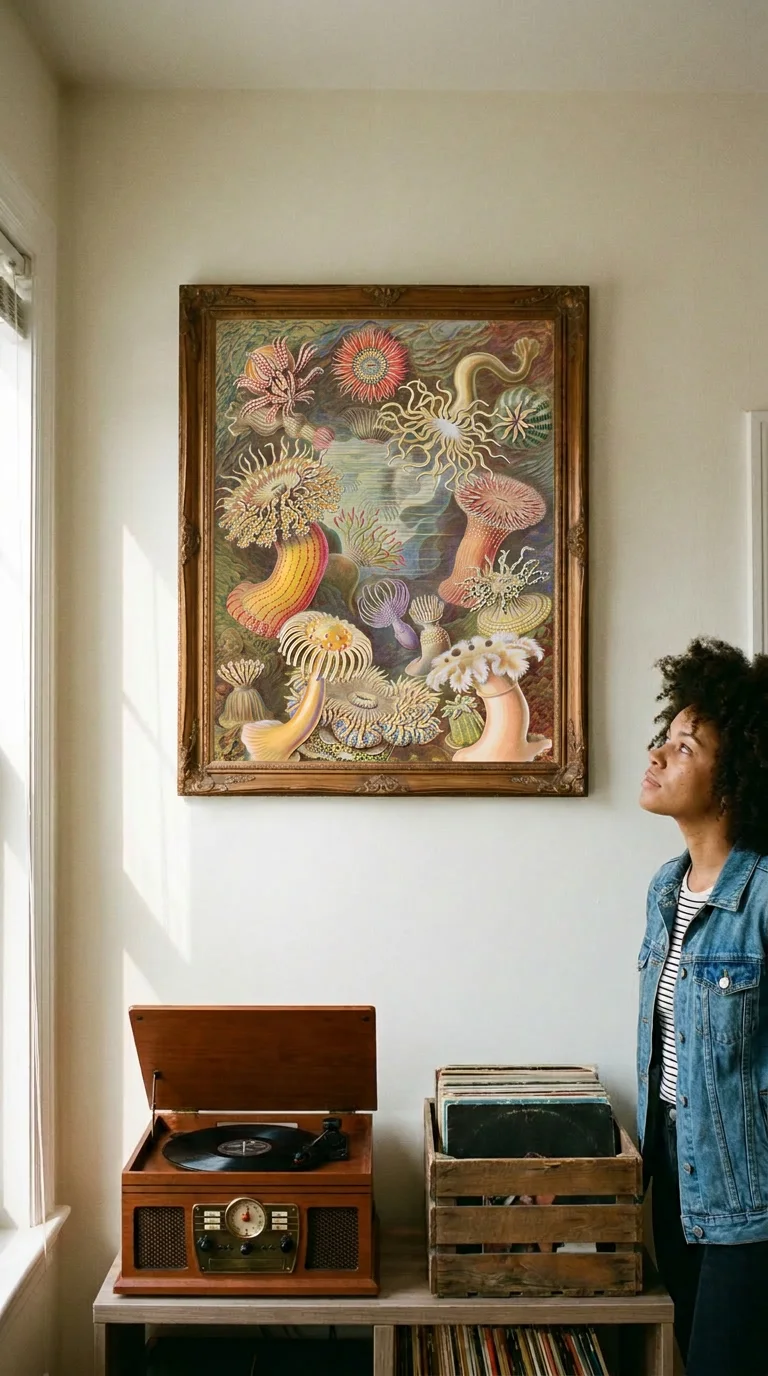
And the same artwork, same product photo, in a second room:
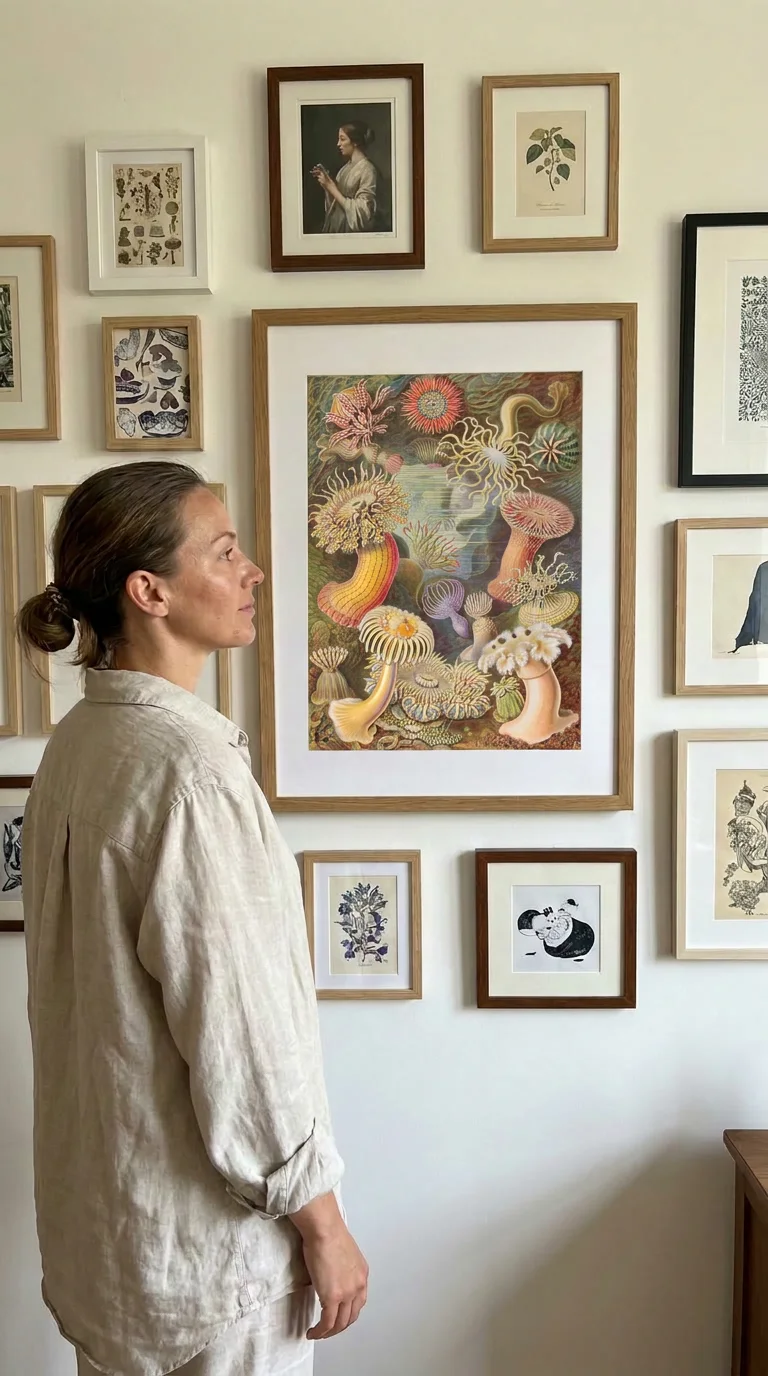
Two things separate a mockup that sells from one that looks fake:
- The artwork must be unchanged. Correct proportions, correct colours, nothing invented or cropped off. If the generated image redraws part of your print, throw it away. That check is worth making on every mockup.
- The room must be plausible. Believable light, real furniture, sensible hanging height. A frame floating at ceiling height in a room with no shadows reads as fake immediately.
Two rules to hold yourself to. A mockup must not misrepresent what arrives, so do not imply a frame is included if it is not, and do not show a size you do not sell. And if the image is AI generated, label it: TikTok and Meta both require realistic AI content to be disclosed, and a line in the caption is enough.
How often to post, and a weekly workflow
Consistency beats volume, and the plan has to survive a busy week. Batch the making on one day, then let the posting happen across the week.
| Day | Channel | Post |
|---|---|---|
| Monday | Pinterest, Instagram | Room mockup of one print, tall crop for the pin |
| Tuesday | TikTok or Reels | Process or framing clip |
| Wednesday | Gallery wall or room pairing idea, two or three pins | |
| Thursday | Instagram, Facebook | Carousel: one print at three sizes, or three frame colours |
| Friday | Stories | "This or that" poll on two prints for the same wall |
| Saturday | Older piece from the back catalog, new image and description | |
| Sunday | Facebook or Instagram | Customer photo, or the story behind one piece |
If that is too much, cut it to three: one room mockup, one process or education post, one back catalog pin. Three a week you keep up beats seven that stop in March. There is a fuller version in our weekly social media schedule, and a look at frequency in how often should a Shopify store post.
One batching tip specific to prints: when you shoot or generate a mockup, make the tall crop at the same time. A 2:3 pin, a 4:5 feed image and a 9:16 story from one scene cost almost nothing extra and fill three slots.
Seasonal and gift timing
Wall art sells against occasions more than most categories, because a print is a common gift and a common part of moving and redecorating. Plan a light theme per month, not a campaign per week.
| Period | What people are doing | What to post |
|---|---|---|
| January | Refreshing rooms after the holidays | Gallery wall ideas, blank wall makeovers |
| February | Valentine's, small gifts | Pairs of prints, romantic or personal themes |
| March and April | Spring cleaning, Mother's Day in many markets | Botanicals, light colour palettes, gift edits |
| May and June | Graduations, weddings, housewarmings | Gift guides by price, city and map prints |
| July and August | Moving season, dorms and first flats | Small format prints, cheap framing advice |
| September and October | Autumn refresh, back to routine | Warmer palettes, cosy room shots |
| November | Gift research starts in earnest | Gift guides, bundles, framed options |
| December | Buying, then panicking about delivery | Shipping deadlines, digital or printable alternatives |
Two dates matter more for prints than for most products: the last order date for framed pieces, because framing adds days, and the last date for anything shipped in a tube. Post both clearly and more than once in December. A buyer who finds out at checkout that they missed it does not come back.
Where Yoomru fits
Full disclosure: Yoomru is our app. It is a Shopify app that posts your products to social media, automatically when a product goes live, on a recurring schedule, or by hand from a calendar. We built it for product catalogs generally, then added a few things specifically because print shops kept hitting the wall described above.
What matters for wall art:
- Pinterest as a real channel. Each board connects as its own channel, so "Bedroom art" and "Gallery wall ideas" can receive different products. Pins carry their own title, description and alt text. Pinterest video is not supported yet, so pins go out as images.
- Planners for the back catalog. A planner picks products matching a collection, tag or type and posts them on a schedule, in random order, without repeating until it has been through the set. Point one at "Botanical prints" and it keeps pinning older work while you make new work.
- Collages: branded still images built from a product's own photos, at pin, square, portrait or story size. No AI, and every network accepts them.
- Wall art scenes. Four rooms we authored ourselves: a record player corner, a gallery wall, above a bed, and someone holding a frame to the wall. Your artwork goes into the empty frame. The two mockups earlier in this post came from the first two.
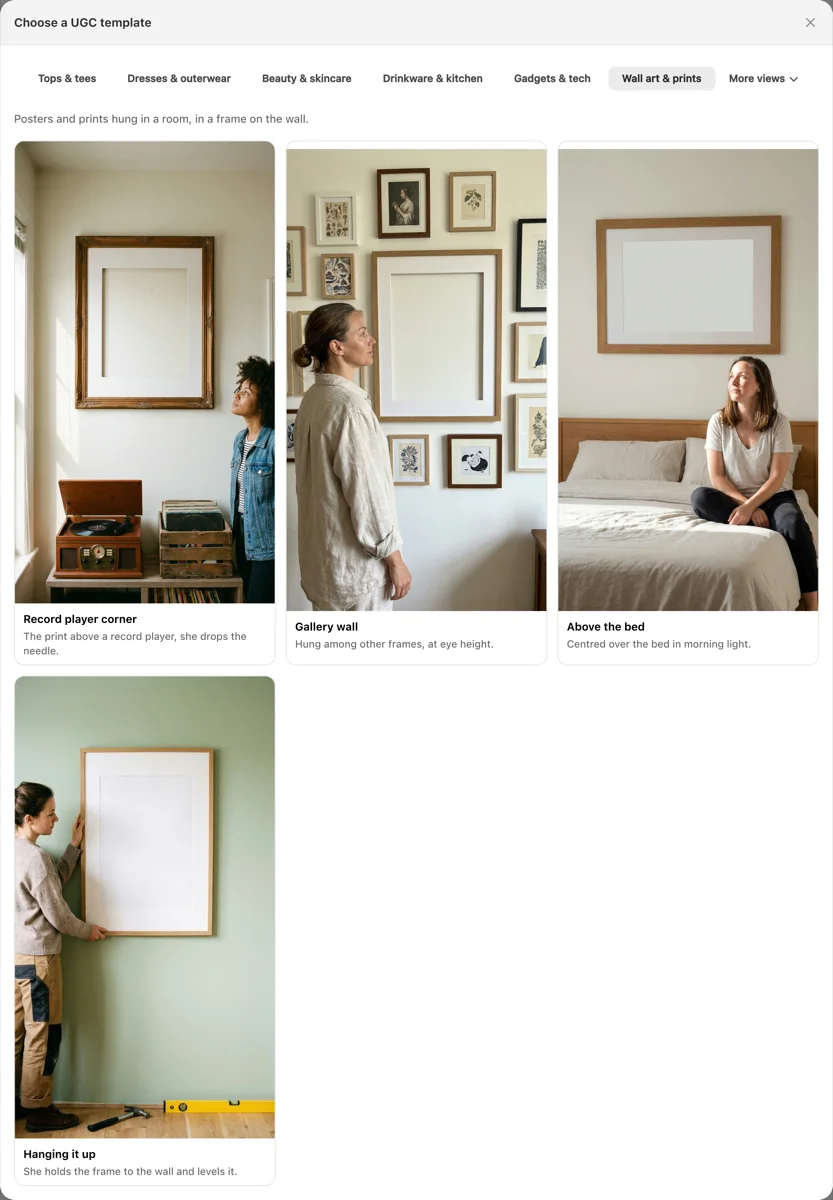
Each scene makes either a still or a short clip. An AI image costs 15 credits and a five second video 50, from a monthly allowance that also pays for AI captions at one credit each. The still publishes anywhere, including Pinterest and Google Business Profile, which do not accept generated video. Posts carrying an AI clip get a "Created with AI" line added to the caption by default.
If your artwork also goes onto tees and sweatshirts, which it does for a lot of print shops, the same picker has clothing scenes behind a garment try-on model. That is a different job with different rules, and it has its own guide: how to market a clothing brand on social media.
Two honest limits. AI composites are not free, so they suit best sellers and new releases rather than a thousand SKUs. And they do not replace photographing your own work at least once: a real photo of a real frame on a real wall still does something a generated scene does not.
The free plan publishes real posts rather than previews, and the feature documentation is at yoomru.com/documentations. For how it compares with other apps in the category, including where it loses, we tested nine competitors hands on in the best Shopify social media auto-post apps.
Checklist before you post
- The artwork appears on a wall, not only as a flat file.
- There is something in the frame that gives a sense of scale.
- The colours in the mockup match the actual print, and the caption says the sizes.
- Framing is either shown or explicitly excluded, with no ambiguity.
- The Pinterest version is a tall crop with a written description and alt text.
- The link goes to the product or collection page, not the homepage.
- Anything AI generated is labelled.
- Something from the back catalog is scheduled this week, not only new work.
FAQ
Should a print shop really start with Pinterest instead of Instagram?
For most wall art shops, yes. People use Pinterest while planning a room, which is when a print is genuinely useful to them, and pins keep being found long after posting. Instagram is better for building a following and a style. Do both if you can, but if hours are limited, start with Pinterest.
How many times can I post the same print?
As often as the image is different. The same artwork in a new room, at a new size or in a different frame is a new post. What gets tired is the identical image with the identical caption. Because prints do not date, recirculating older work is normal rather than lazy.
Do I need a real photographer?
No, but you do need one honest reference shot of your own work. A framed print on a well lit wall, photographed on a phone, tells buyers more about your paper and colour than a stack of generated scenes. Use that as the anchor and mockups for breadth.
Are AI room mockups allowed?
They are, with two conditions. Label them where the platform requires it, and do not misrepresent the product. A mockup that implies a frame you do not include, or colours the print does not have, is a returns problem and a trust problem whatever the platform rules say. Digital and printable versions, which sell well in late December once shipping deadlines pass, are covered in digital product ideas for Shopify.
How do I get customer photos?
Ask, in the box. A small printed card with your handle, asking buyers to tag you when they hang it, works better than an email. Reshare with credit and permission. Customer walls persuade because nobody suspects them of being staged.
Should I automate posting?
Automate the repetitive half: recirculating the back catalog, pinning consistently, keeping a channel from going quiet. Keep the rest human: replying to comments, judging whether a mockup is good enough, writing about a piece you care about. Automate the schedule, not the judgment. More on where that line sits in avoiding spammy social media posting.