
 Facebook
 Instagram
 X (Twitter)
 TikTok
 Pinterest
 YouTube
 LinkedIn
 Threads
 Google Business Profile
 Telegram
 Discord
How to Sell Art Prints on Pinterest: A Guide for Poster and Print Shops


Ask a print shop where its traffic comes from and Pinterest is usually the answer, or the answer it wishes it had. Our guide to marketing wall art on social media puts Pinterest first among the channels and then moves on. This post is the part it moved on from: how to actually run it for posters and prints.
The short version is that Pinterest is not a social network you post to. It is a visual search engine that people use while planning a room, and a print shop is one of the few kinds of business whose product is literally what they are searching for. Everything below follows from that.
Yoomru, the app we make, appears near the end where it is relevant, with its limits stated.
Pinterest behaves like search, not a feed
On Instagram a post is an event. It goes out, it gets its day, it is gone. On Pinterest a pin is closer to a page you published: it gets indexed against the words attached to it, and it keeps being served to people whose search matches, for as long as it keeps being useful.
Three practical consequences, and they are the whole strategy:
- Write for the query, not for your followers. Nobody is waiting for your next pin. Somebody is typing "botanical prints bedroom" tonight, and the question is whether your work is in that result.
- Judge results in months. A pin can be quiet for six weeks and then bring traffic for a year. Deciding a pin failed after two days is the single most common mistake here.
- Your back catalogue is inventory, not history. A print from two years ago answers the same query as one from Tuesday, so old work deserves new pins rather than an archive.
It also means the work compounds. A hundred well described pins is a hundred entries in an index, and the hundredth one does not replace the first.
Boards are rooms and styles, not SKUs
The most common setup mistake is organising boards the way your store is organised. "New arrivals", "Shop all", "A2 prints" and "Collection 03" are warehouse categories. Nobody searches for them.
Name boards after the thing a buyer is trying to solve, in their words:
- Gallery wall ideas
- Bedroom art, above the bed
- Kitchen and hallway prints
- Botanical illustration prints
- Mid century modern posters
- Small prints for rented flats
- Art print gift ideas
Eight to fifteen boards is plenty. Give each one a written description that says what it holds, in sentences rather than a comma-separated pile of keywords. And accept that one artwork belongs on several boards: a botanical print is a botanical print, a bedroom print and a gift, and it can appear as all three over the course of a year with a different image and a different description each time.
The rule of thumb for a new board is that you should be able to imagine somebody typing its name into the search box. If you cannot, rename it.
What belongs in the pin image
Pins are tall. The standard is 2:3, commonly 1000 by 1500 pixels, and taller formats get cropped in the feed while square ones give away space to whatever is next to them.
For wall art the image is almost always a room, not the flat scan. A framed print on a wall tells Pinterest what category it is looking at and tells a person whether it suits their bedroom, and the flat file does neither. If you do not have room images, that is a fixable problem: room mockups without a photoshoot covers the three ways to make them.
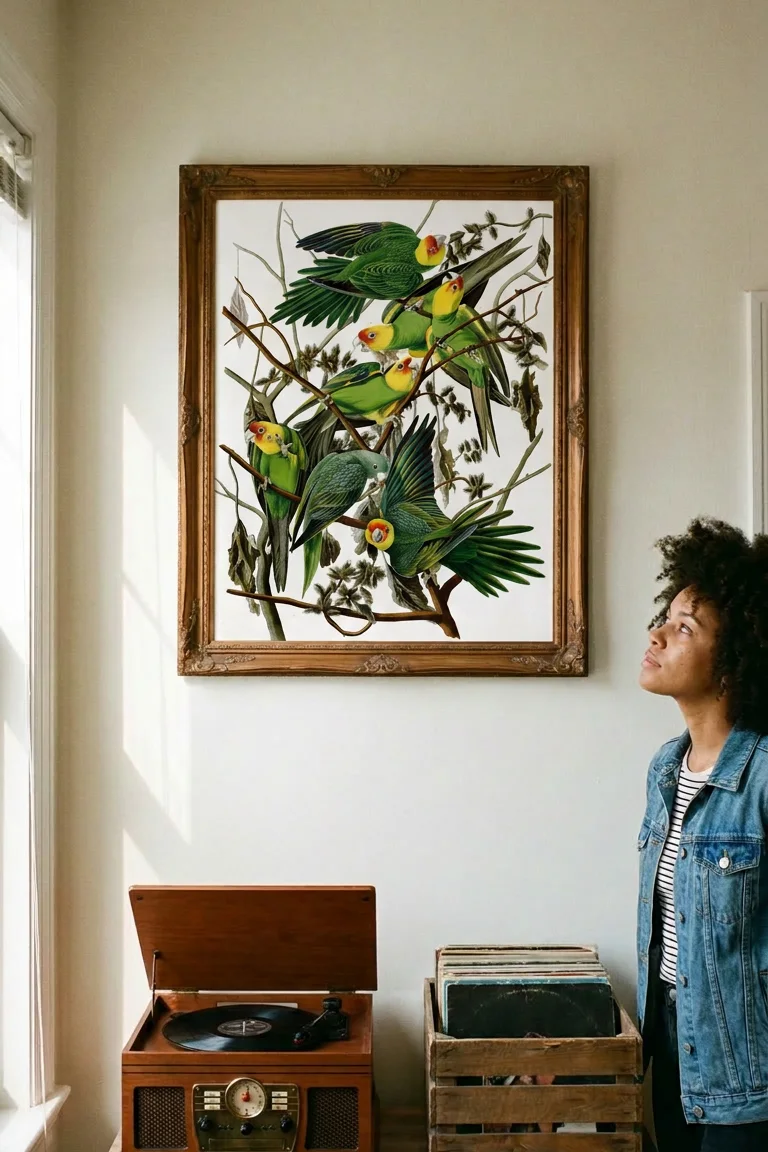
Here is a mockup cropped to pin shape. The same scene also gave a 4:5 for the feed and a 9:16 for stories, which is the argument for shooting or generating wider than you need:
A few things that consistently make a pin worse: six prints tiled into one image that nobody can read at thumbnail size, a logo big enough to compete with the artwork, a flat product shot on a white background, and text overlaid in a colour that vanishes on a phone. If you do add text, add it because it carries a word somebody would search, not because pins are supposed to have text.
Title, description and alt text
Three separate fields doing three separate jobs. Filling in one and ignoring the others is leaving the pin half described.
- Title. Lead with what the thing is and where it goes: "Carolina Parrot bird print, framed botanical art for a bedroom wall". Keep it under 100 characters, because that is where Pinterest cuts it off.
- Description. Up to 500 characters, and it should read like a person wrote it. Say what the artwork is, what sizes it comes in, whether framing is included, what colours it sits well with and which room it suits. That is a description that happens to contain the words people search, which is the correct order of priorities.
- Alt text. Describe the image itself, for somebody who cannot see it: "an oak framed bird print hanging above a record player in a sunlit corner". It costs nothing, it is the right thing to do, and it is one more honest description of what is in the picture.
What not to do: keyword stuffing, a wall of hashtags, or the same description pasted onto forty pins. Repetition is how a set of pins stops being distinguishable, to people and to Pinterest.
The words people actually type
You do not need a paid keyword tool for this. Pinterest publishes its own topic pages, and they are a free readout of how people phrase things. For wall art, real examples include "wall art above bed", "gallery wall bedroom", "over bed gallery wall" and "above bed gallery wall layout": four different phrasings of one wall, and they are not interchangeable.
Two more sources, both free. The search box autocompletes as you type, and the tiles that appear under a search are Pinterest's own suggested refinements. Type "wall art" and note what it offers you.
The pattern that works for prints is roughly style plus subject plus room plus format: "minimalist botanical print for a bedroom", "vintage bird illustration poster for a hallway", "black and white photography print above a sofa". Longer phrases have fewer people typing them and more of those people ready to buy.
One caveat, since this is the internet and everyone quotes numbers at you: we have not verified search volumes for any of these phrases, so we are not going to state any. Use the phrasings as evidence of how people write, and let your own analytics tell you which ones matter to your shop.
How often to pin, and the long tail
Pinterest favours fresh pins, meaning a new image, over the same image saved again. For a print shop that is good news: the same artwork in a new room, at a new size or in a different frame is a fresh pin, and you have a catalogue's worth of them.
- A few pins most days beats thirty in one afternoon. Spread them, and spread them across boards.
- Mix new work and old. A useful default is one new release for every two or three back catalogue pins.
- Give each pin its own description. If two pins of the same print carry the same words, the second one is doing very little.
- Stop reading the first week. Look at a month, then a quarter.
Rich pins and the link back
Every pin should link to the product or collection page it shows, never to your homepage. A buyer who has to go hunting after clicking does not go hunting.
Rich pins are worth twenty minutes of setup. They pull metadata from your own site so the pin carries live title, price and availability, and they apply across your domain once one URL has been approved. You need a business account, your website claimed, and the product metadata present on the page. Shopify themes generally emit the right tags already, so for most shops this is a validation step rather than development work. It is done on Pinterest and on your store, not inside any posting app, including ours.
Planning the year
The seasonal calendar in the pillar guide applies here, with one adjustment: pin earlier than you would post elsewhere. Because pins surface over weeks rather than hours, a Christmas gift pin published in December is competing with pins that have been indexed since September.
- Start a seasonal push roughly six to eight weeks before you would on Instagram.
- Keep the seasonal boards year round rather than deleting them, so they carry authority into next season.
- Post your shipping deadlines as their own pins in December, in the image and not only in the description.
- Leave evergreen boards alone. "Gallery wall ideas" works in March and in November.
Where Yoomru fits
Full disclosure: Yoomru is our app, a Shopify app that posts products to social media automatically. Pinterest is one of the eleven networks it supports, and it is wired the way this post describes.
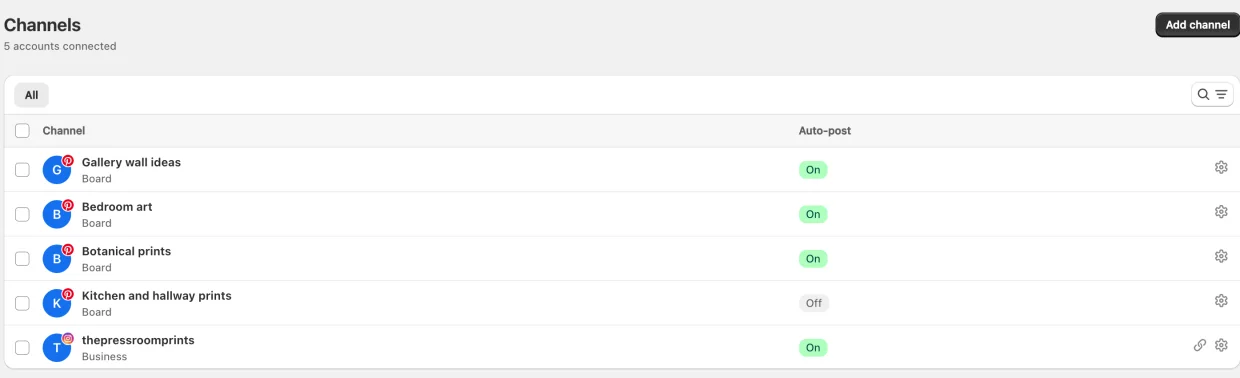
Each board is its own channel. When you connect Pinterest, every board you pick becomes a separate channel with its own settings, so "Bedroom art" and "Botanical prints" can receive different products. Each channel has its own auto-share filter, so a collection can be pointed at exactly one board.
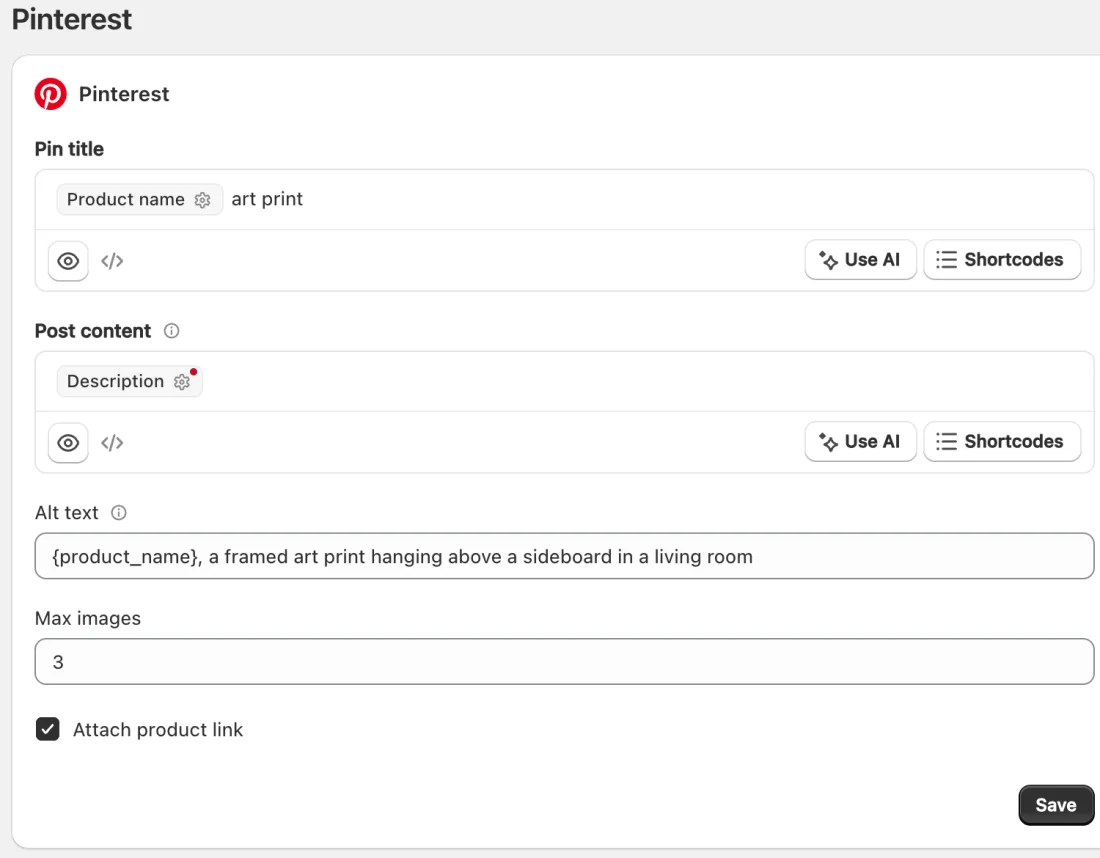
Pin title, description and alt text are templates. You write them once with shortcodes such as {product_name} and {product_description}, and every pin fills them in with its own product at the moment it publishes. Max images decides how many of a product's photos get pinned, from one to ten, and each image becomes its own pin.
Collages come out at pin size. A collage is a branded still built from a product's own photos, with no AI involved. Left on automatic sizing it renders 2:3 for Pinterest and square or 9:16 elsewhere, so one setting produces the right shape per channel.
Planners work the back catalogue. A planner picks products matching a collection, tag or type and pins them on a schedule in random order, without repeating until it has been through the whole set. Pointed at "Botanical prints" it keeps a board active while you make new work.
Four limits worth knowing before you rely on any of it:
- No video pins yet. A post carrying only a video fails with a message rather than posting something broken. Stills, collages and AI images all publish normally.
- Alt text applies to auto-shared pins. The template in Settings goes out with pins created automatically when a product goes live. Pins you build in the composer or through a planner do not carry it yet, so those still need alt text added on Pinterest if you want it.
- Rich pins are not ours to set up. That is your store's metadata and Pinterest's validator, as above.
- New Pinterest apps have modest rate limits. Spreading a planner's posts, rather than firing forty at once, is the practical answer.
The free plan publishes real posts rather than previews, and the Pinterest documentation is at yoomru.com/documentations. The general network walkthrough, not specific to prints, is how to promote Shopify products on Pinterest.
Before you pin
- The image is 2:3 and shows the print on a wall, not on a white background.
- The title says what it is and where it goes, inside 100 characters.
- The description is written for a person and mentions sizes and framing.
- Alt text describes the image.
- The link goes to the product or collection page.
- The board is one somebody would search for.
- Something from the back catalogue is queued this week, not only new work.
FAQ
How many pins a day should a print shop publish?
Enough to be regular, few enough to keep up. A handful most days, spread across boards, is a workable target for a one person shop, and consistency over months matters more than the number on any given day. Bursts followed by silence are the pattern to avoid.
Can I pin the same print more than once?
Yes, and you should. A new image of the same artwork, in a different room or at a different size, with its own description, is a fresh pin. What wears out is the identical image with the identical text.
Do I need video pins or Idea pins?
Not to sell prints. Wall art is a still category: a room, a frame, a wall. Video is worth trying if you enjoy making it, but stills carry a print shop on Pinterest, and Yoomru cannot publish Pinterest video yet in any case.
Do followers matter on Pinterest?
Much less than on a feed. Most of what reaches people arrives through search and recommendations rather than a follow, which is why board names and descriptions deserve more of your attention than your follower count does.
Business account or personal?
Business, and claim your website while you are in there. It is what unlocks analytics and rich pins, and it is a five minute job.