
 Facebook
 Instagram
 X (Twitter)
 TikTok
 Pinterest
 YouTube
 LinkedIn
 Threads
 Google Business Profile
 Telegram
 Discord
Pinterest for Jewelry Businesses: How to Sell Jewelry on Pinterest


Pinterest is the channel jewellery shops either swear by or have never opened, and there is rarely anything in between. Our guide to social media marketing for jewelry businesses puts it second among the channels and then moves on. This post is the part it moved on from: how to actually run it.
The short version is that Pinterest is not a social network you post to. It is a visual search engine people use while planning a wedding, an outfit or a present, and jewellery is one of the few products that is literally what they are searching for. Everything below follows from that.
Yoomru, the app we make, appears near the end where it is relevant, with its limits stated.
Can you actually sell jewelry on Pinterest?
Yes, and the platform is unusually well suited to it. Pinterest's own figures put the great majority of top searches as unbranded, which is the condition an unknown shop needs: nobody has to have heard of you to find your work. It reports that its luxury audience buys watches and jewellery at a far higher rate than shoppers on other platforms, and that most of its users think of it as a place to shop rather than a place to scroll.
Two structural advantages matter more than any of those numbers. The first is gift intent. Pinterest says a very large share of its users come to it for gift ideas, and jewellery is the gift category, which means a good part of your audience there is someone shopping for a person who is not them.
The second is that Pinterest's merchant rules are permissive where other platforms are not. There is no jewellery category restriction, and pre-owned and vintage jewellery is explicitly allowed, where selling second-hand fine jewellery through TikTok Shop needs permission you may not get. If you deal in vintage or estate pieces, that is not a small difference.
What Pinterest does ask for is ordinary shop hygiene: a business account, a claimed website, a clear returns policy, and pricing and stock that are actually current. It also asks that images are not blurry or grainy and that claims are not exaggerated, both of which land harder on jewellery than on most categories.
Pinterest behaves like search, not a feed
On Instagram a post is an event. It goes out, it gets its day, it is gone. On Pinterest a pin is closer to a page you published: it gets indexed against the words attached to it and keeps being served to people whose search matches, for as long as it is useful.
- Write for the query, not for your followers. Nobody is waiting for your next pin. Somebody is typing "gold cuff outfit" tonight, and the question is whether your work is in that result.
- Judge results in months. A pin can be quiet for six weeks and then bring traffic for a year. Deciding a pin failed after two days is the most common mistake here.
- Your back catalogue is inventory, not history. A piece from two years ago answers the same query as one from Tuesday, so old work deserves new pins rather than an archive.
It also means the work compounds. A hundred well described pins is a hundred entries in an index, and the hundredth does not replace the first.
Boards a buyer would actually search for
The most common setup mistake is organising boards the way your store is organised. "New in", "Shop all", "Collection 03" and "Sterling silver" are warehouse categories. Nobody searches for them.
Name boards after the thing a buyer is trying to solve, in their words:
- Everyday gold jewellery
- Necklace layering ideas
- Minimalist bridal jewellery
- Gifts for her under fifty
- Anniversary gift ideas
- Statement earrings for a wedding
- Handmade silver rings
- Vintage and heirloom jewellery
Eight to fifteen boards is plenty. Give each one a written description in sentences rather than a comma-separated pile of keywords. And accept that one piece belongs on several boards: a gold pendant is everyday jewellery, a layering piece and a gift, and it can appear as all three over a year with a different image and a different description each time.
The test for a new board is whether you can imagine somebody typing its name into the search box. If you cannot, rename it.
What belongs in the pin image
Pins are tall. The standard is 2:3, commonly 1000 by 1500 pixels, and Pinterest says outright that a pin taller than 2:3 may be cut off in the feed. That single line matters more for jewellery than for most categories, because the obvious shortcut is to reuse a 9:16 Reels frame, and a 9:16 pin loses its top and bottom in exactly the place a pendant tends to sit.
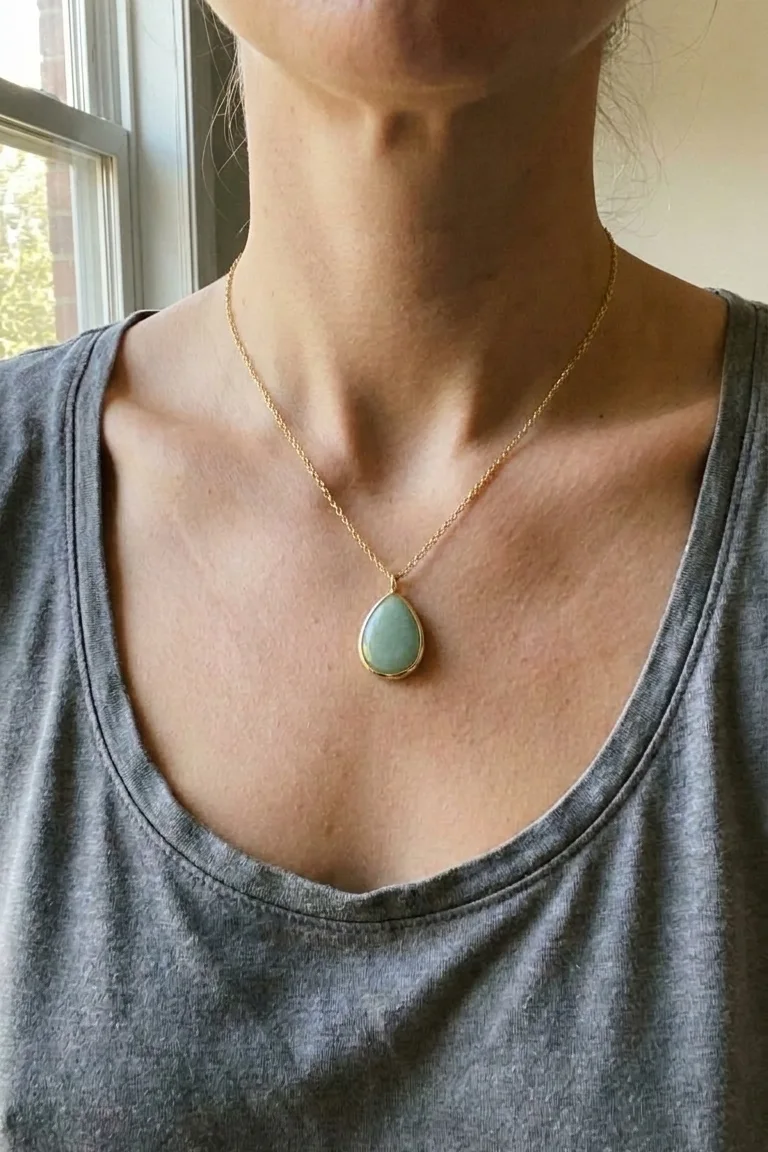
For jewellery the image should almost always be the piece worn, not the flat product shot. A worn shot tells Pinterest what it is looking at, tells a person how big the piece is, and looks like the kind of image people save. The flat shot does none of those things.
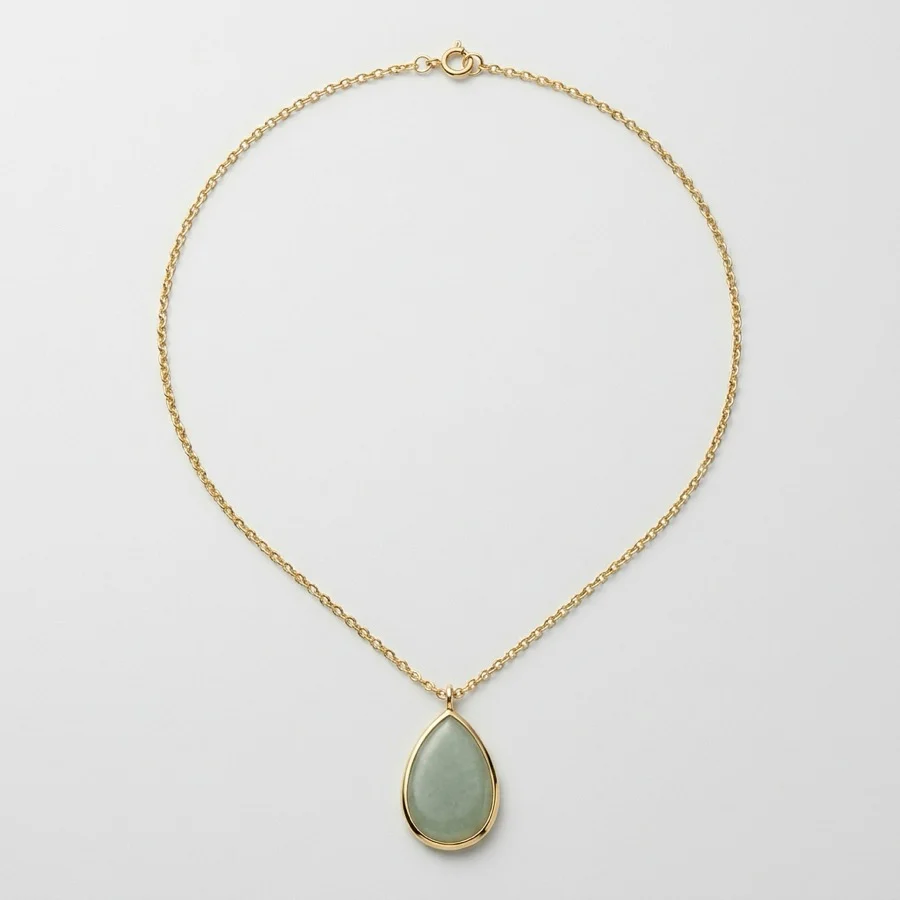
This is the flat product photo, which is the right image for a product page and the wrong one for a pin:
And this is the same piece cropped to pin shape. The same scene also gave a 4:5 for the Instagram feed and a 9:16 for Stories, which is the argument for shooting or generating wider than you need:
If you have no worn shots, that is a fixable problem rather than a permanent one: jewelry product photography at home covers the three ways to make them. There is also a general walkthrough of the format in Pinterest pin size for Shopify product promotions.
Things that reliably make a jewellery pin worse: six pieces tiled into one image that nobody can read at thumbnail size, a logo big enough to compete with the piece, a flat shot on pure white that vanishes against Pinterest's own background, and text in a colour that disappears on a phone. If you add text, add it because it carries a word somebody would search.
Title, description and alt text
Three fields doing three jobs. Filling in one and ignoring the others leaves the pin half described.
- Title. Lead with what the piece is and who it is for: "Green stone pendant necklace, gold plated, a gift for her". Keep it under 100 characters, because that is where Pinterest cuts it off.
- Description. Up to 500 characters, written like a person wrote it. Say what the metal is, what the stone is, what lengths it comes in, what it goes with and what occasion it suits. That is a description that happens to contain the words people search, which is the right order of priorities.
- Alt text. Describe the image for somebody who cannot see it: "a small green teardrop pendant on a fine gold chain, worn at the collarbone". It costs nothing, it is the right thing to do, and it is one more honest description of what is in the picture.
One thing specific to this category: whatever you say about metal and stones in a pin has to be as accurate as it would be on the product page. "Gold" means solid gold, plated pieces have to say plated, "vermeil" has a technical definition, and a lab-grown stone needs its qualifier immediately before the stone's name. A pin is advertising, and jewellery advertising is regulated in a way that most product categories are not. The pillar guide covers what the rules actually say.
Product pins and the link back
Every pin should link to the product or collection page it shows, never to your homepage. A buyer who has to go hunting after clicking does not go hunting.
Beyond that, a catalog feed is worth the setup. It turns your products into pins that carry live price and availability, and it needs a business account, a claimed website and eight required fields on each product: an id, a title, a description, a link, an image link, a price, availability and an item group id. Shopify emits most of that already, so for most shops this is a validation job rather than development work. Two details catch jewellery shops out: product images want to be at least 1000 by 1500 pixels, and Pinterest will not refresh an image if you reuse the same URL, so a re-shoot needs a new file name.
All of that happens on Pinterest and on your store, not inside any posting app, including ours.
Pinning the year
Jewellery is bought to a calendar, and Pinterest runs ahead of it. Pinterest's own advice is that seasonal searching starts on Pinterest months before it starts elsewhere, and its rule of thumb is to launch about two months before a moment peaks. In practice that means starting a seasonal push six to eight weeks before you would on Instagram.
- Engagement season, roughly November to February. A large share of proposals happen in that window, but ring research does not spike with them: people look for months first. Bridal boards should be live and full long before December.
- Valentine's Day. Start in early January, not February.
- Mother's Day, twice. The UK date falls in March and the US one in May, and gift searching genuinely peaks a second time in spring. Most jewellery marketing misses it.
- Christmas. Pinterest says holiday activity begins as early as September. Pin gift guides then, and pin your shipping and engraving deadlines as their own images in December, with the dates in the image rather than only in the description.
- Keep seasonal boards year round rather than deleting them, so they carry authority into next season.
It is also worth reading Pinterest's own trend reporting once a year, because it is one of the few places that publishes what is rising in this category rather than guessing. Recent reporting on its jewellery trends has picked out brooches, bold gold cuffs, opalescent stones and heirloom pieces, which is the sort of thing you can name in a board title the same afternoon.
Where Yoomru fits
Full disclosure: Yoomru is our app, a Shopify app that posts products to social media automatically. Pinterest is one of the eleven networks it supports, and it is wired the way this post describes.
Each board is its own channel. When you connect Pinterest, every board you pick becomes a separate channel with its own settings, so "Everyday gold jewellery" and "Minimalist bridal" can receive different products. Each channel has its own auto-share filter, so a collection can be pointed at exactly one board.
Pin title, description and alt text are templates. You write them once with shortcodes such as {product_name} and {product_description}, and every pin fills them in with its own product at the moment it publishes. They prefill the composer and new planner templates as well as auto-share, so a pin does not quietly go out without alt text just because you built it by hand. Max images decides how many of a product's photos get pinned, from one to ten, and each image becomes its own pin, which suits jewellery: the flat shot, the worn shot and the macro can all go out as separate pins for one product.
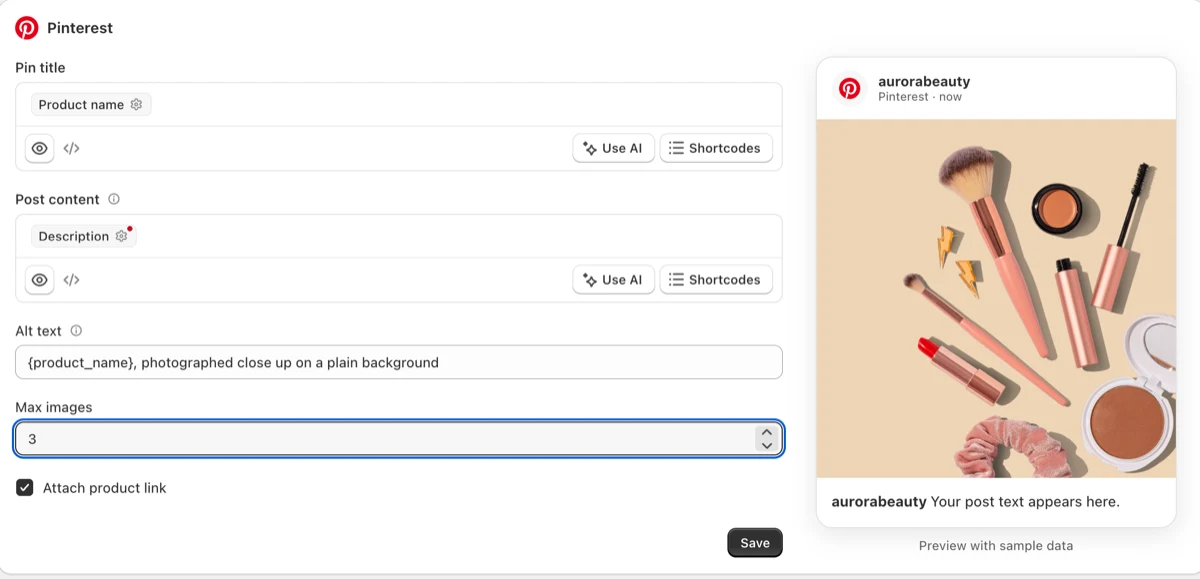
Collages come out at pin size. A collage is a branded still built from a product's own photos, with no AI involved. Left on automatic sizing it renders 2:3 for Pinterest and square or 9:16 elsewhere, so one setting produces the right shape per channel.
Planners work the back catalogue. A planner picks products matching a collection, tag or type and pins them on a schedule in random order, without repeating until it has been through the whole set. Pointed at your everyday pieces it keeps a board active while you make new work.
Four limits worth knowing before you rely on any of it:
- No video pins yet. A post carrying only a video fails with a message rather than posting something broken. Stills, collages and AI images all publish normally.
- Long templates get cut rather than rejected. A pin title is truncated at 100 characters and a description at 500, which are Pinterest's limits rather than ours, so write templates that still read well short.
- Catalog feeds are not ours to set up. That is your store's product data and Pinterest's validator, as above.
- New Pinterest apps have modest rate limits. Spreading a planner's posts, rather than firing forty at once, is the practical answer.
The free plan publishes real posts rather than previews, and the Pinterest documentation is at yoomru.com/documentations. The general network walkthrough, not specific to jewellery, is how to promote Shopify products on Pinterest.
Before you pin
- The image is 2:3 and shows the piece worn, or at least at a size a person can judge.
- The title says what the piece is and who it is for, inside 100 characters.
- The description is written for a person and names the metal, the stone and the lengths.
- Every metal and stone claim is worded the way it would have to be on the product page.
- Alt text describes the image.
- The link goes to the product or collection page.
- The board is one somebody would search for.
- Something from the back catalogue is queued this week, not only new work.
FAQ
How many pins a day should a jewelry shop publish?
Enough to be regular, few enough to keep up. A handful most days, spread across boards, is a workable target for a one person shop, and consistency over months matters more than the number on any given day. Bursts followed by silence are the pattern to avoid.
Can I pin the same piece more than once?
Yes, and you should. A new image of the same piece, worn differently, styled with something else or shot at a different angle, with its own description, is a fresh pin. What wears out is the identical image with identical text.
Do I need video pins?
Not to sell jewellery, though a slow turn under a light is one of the few pieces of video this category is genuinely good at. Stills carry a jewellery shop on Pinterest, and Yoomru cannot publish Pinterest video yet in any case.
Can I sell vintage or second-hand jewelry on Pinterest?
Yes. Pinterest's merchant guidelines allow pre-owned items in this category, which is not true of every platform, and it is worth building boards around if estate and vintage pieces are part of what you sell.
Do followers matter on Pinterest?
Much less than on a feed. Most of what reaches people arrives through search and recommendations rather than a follow, which is why board names and descriptions deserve more of your attention than your follower count does.