
 Facebook
 Instagram
 X (Twitter)
 TikTok
 Pinterest
 YouTube
 LinkedIn
 Threads
 Google Business Profile
 Telegram
 Discord
Instagram Reels for Clothing Brands: What to Film and How to Post It


Ask a clothing brand where its new customers come from and the answer, more often than not, is one Reel that did something unusual. Our guide to marketing a clothing brand on social media puts Instagram first among the channels and Reels first within Instagram, then moves on. This post is the part it moved on from: what to film for a clothing store, how to post it, and what a Reel realistically does.
The short version is that clothing is a category people judge in motion, and Reels is the one format Instagram routinely puts in front of people who do not follow you yet. Everything below follows from that.
Yoomru, the app we make, appears near the end where it is relevant, with its limits stated.
Twelve Reel ideas for a clothing brand
You do not need twelve ideas a week. You need a handful of formats you can refill, so that "what do I film today" has an answer before you pick up the phone.
| Format | What happens on screen | What it is for |
|---|---|---|
| The turn | One piece, one slow turn, front to back | Drape and fit, in seven seconds |
| Fit check | Full outfit, head to toe, said out loud: what it is, what size, how tall you are | The strongest performing format in fashion |
| Styled three ways | The same garment, three outfits, hard cuts | Justifying the price |
| Two on one | The same size on two different bodies, heights on screen | Answering the fit question |
| Fabric close-up | Hands on the cloth: stretch it, scrunch it, let it fall | Quality, without saying "quality" |
| Get ready with me | The piece going on, in real time, in a real room | Making it feel wearable |
| Try-on haul | Four or five pieces in a row, quick cuts, honest verdicts | Selling a collection rather than an item |
| Restock or drop | The boxes, the rail filling, the sizes going up | Urgency that is actually true |
| Packing an order | Tissue, card, sticker, label, done | Trust, and it performs far better than it should |
| Behind the making | Cutting, sampling, pressing, a fitting | The reason to buy from you and not a marketplace |
| Answering a message | A real fit question, read out and answered | Removing the last objection |
| Customer wearing it | Their clip, reshared with permission and credit | The only proof nobody suspects |
Two of those are worth singling out. The fit check is the format the whole category runs on: benchmark studies of fashion accounts on short video put it at the top by engagement, well clear of the next best thing, and it is nothing more than a person saying what they are wearing and what size it is. Packing an order is the one nobody believes until they try it, because it has no styling, no music brief and no talent, and it still works.
Notice how few of these need a model or a location. Most are a phone, a garment and a table. The formats that survive a busy week are the ones you can film in four minutes.
Filming when you will not go on camera
This is the most common blocker among people who own small clothing brands, and it is rarely about laziness. Plenty of owners simply do not want their face or their body in the content, and being told to do a get-ready-with-me every week is not advice, it is a wall. Faceless formats that work for clothing:
- Hands only. Folding, steaming, packing, unrolling a bolt of fabric, sewing a label, writing a note.
- The rail and the table. Pieces being hung, arranged, swapped, laid out into an outfit.
- Crop at the collarbone. A worn garment shot from the neck down is still a fit reference and still shows drape.
- Text-led. A question on screen, then the answer shown rather than spoken: "which one for a wedding?", three options, done.
- Someone else's hands. A friend, a partner, a customer who agreed. It does not have to be you.
- Generated on-model clips, covered below, for the pieces you never got round to filming.
The one thing faceless content costs you is voice, and voice is what makes an account feel like a person. You can get most of it back by talking over the footage rather than appearing in it. A voice saying "this is the heavier weight, it does not cling" does more than a caption saying the same thing.
The specs, once
Get these right once and stop thinking about them.
| Thing | What to use |
|---|---|
| Aspect ratio | 9:16, full screen. Instagram accepts anything from 1.91:1 to 9:16 for a Reel, but only 9:16 fills the phone. |
| Resolution and frame rate | 1080 by 1920. Instagram's stated minimums are 720 pixels and 30 frames per second, so a modern phone clears them easily. |
| Length | Seven to fifteen seconds for most clothing clips. A Reel can run to twenty minutes, but Instagram says a Reel over three minutes will not be recommended to new audiences, which for a small brand is the entire point of posting one. |
| Cover | Recommended at 420 by 654 pixels, roughly 1:1.55. Pick a frame where the garment is sharp, and pick carefully: Instagram does not let you change a Reel's cover after it is uploaded. |
| Safe area | Keep text and the garment's key detail out of the top and bottom strips of the frame, where the caption, the account name and the buttons sit. Instagram's own editor shows the boundaries, and they move often enough that memorising pixel values is a waste of time. |
| Sound | Always add something. A silent Reel reads as a broken one. |
One extra crop worth knowing: when a Reel also appears on your feed, Instagram takes the middle square of the cover for the grid. A cover with the garment centred survives that; a cover with the garment at the bottom of the frame does not.
Two habits save more time than any editing trick. Shoot wider than you need, so you can cut a 9:16 for Reels, a 4:5 for the feed and a 2:3 for Pinterest from the same footage. And film in the light you would want the garment to arrive in: colour is the thing screens lie about most in clothing, and a clip filmed under a warm bulb sells an ecru you do not stock.
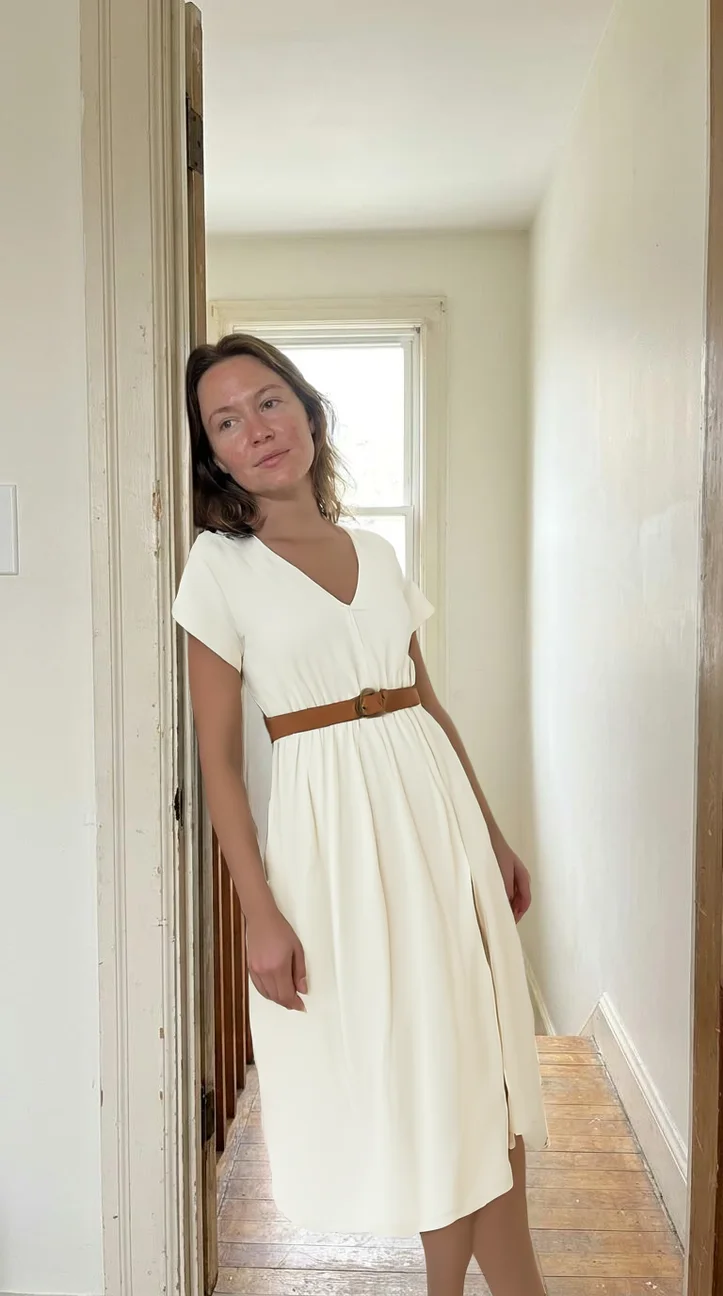
Here is a single frame from the kind of clip this post is about. It is 9:16 and the garment is the subject:
What a Reel actually does, honestly
Two things are worth knowing before you judge your own numbers, because both of them contradict most of the advice on this subject.
Reels are not automatically the biggest reach format. Benchmark studies covering tens of millions of Instagram posts find that carousels out-view Reels at every account size, and that the gap is widest on small accounts, because a carousel gets a second pass through the feeds of people who already follow you. What Reels do that carousels cannot is get shown to people who have never heard of you. Those are different jobs, and a clothing brand wants both.
The numbers on a small account are small. The same studies put an account with a few thousand followers in the region of a few hundred views per Reel, and average engagement rates across tracked fashion brands at under a fifth of one percent, including brands with millions of followers. If your Reels are getting a couple of hundred views, you are not broken. You are normal, and the way out is volume and consistency rather than a fix.
One more measured thing worth acting on: average watch time on a Reel runs to a handful of seconds, not tens of seconds. That is the entire argument for the next section.
The first second
Almost everything about a Reel's performance is decided before the viewer has consciously decided anything. Three rules, in order of importance:
- Open on the garment, not on you walking towards the camera. The first frame should already contain the thing the clip is about.
- Start mid-motion. A clip that begins with the turn already happening holds far better than one that begins with someone standing still, waiting for the music.
- Put the question on screen. Four words at the top: "runs small?", "one dress, three ways", "5'4 in a size M". If someone is scrolling with the sound off, the text is the only thing speaking.
The mistake almost every clothing brand makes is spending the first two seconds on a logo, a title card or a slow fade. Those two seconds are the entire audition. Cut them.
Captions, text on screen and sound
Text on screen is not optional. A large share of people watch with the sound off, and clothing content is full of information that only works as words: the size, the height, the fabric, the price. Keep it big, keep it high contrast, and keep it out of the strips at the top and bottom where the interface sits.
The caption is where the sale gets set up. Say what the piece is, what size is being worn and by whom, what it costs, and what to do next. Instagram captions do not carry clickable links, so the practical answer is a caption that names the piece clearly and a link in your profile that leads somewhere sensible.
Sound matters more than it should. A trending track can help a clip travel, but the version of this that compounds for a clothing brand is your own voice: saying what a fabric is, why a hem sits like that, which size to take. Voice makes the account a person, and people buy clothes from people.
Hashtags are a minor input, and possibly a negative one. At least one large study of Instagram posts found that posts carrying hashtags averaged fewer views than posts without them. That is not proof that hashtags cause the drop, but it is a good reason to stop treating a block of thirty as work. A few specific ones are fine, and none of them will save a clip nobody watched to the end. There is a fuller treatment of writing the words in writing better social media captions.
Where the footage comes from when you have none
The honest bottleneck for most small brands is not ideas, it is not having anything on film. Three ways out, cheapest first.
- Film once, cut many. One thirty-minute session with one person and five pieces can yield fifteen clips if you shoot a turn, a walk, a detail and a fabric handling shot for each. Batch it the way you batch photography.
- Animate the photos you already have. A branded product video built from a product's own images is not a Reel that will travel, but it fills a Tuesday and it looks like your brand rather than like a template. There is a walkthrough in creating product videos for social media.
- Generate an on-model clip. A garment try-on model puts your piece on a photographed person, and the still is animated into a few seconds of movement. Useful for the pieces you never got round to filming. How that works, and how often it goes wrong, is in how to photograph clothing without a model.
Whatever the source, the garment in the clip has to be the garment in the box, at the right length, colour and fit.
How often, and how to read the results
Two to four Reels a week is the level most one-person clothing brands can hold. More is better only if the extra ones are not worse.
- Judge over a month, not a night. Reels are served over days, and a clip that looked dead on Tuesday is sometimes the one still bringing people in three weeks later.
- Repeat what works, with a different garment. A format that performed is a format, not a one-off. Run it again next week on a different piece.
- Do not delete the quiet ones. They cost nothing to leave up and they occasionally wake up.
- Try a trial reel when you are unsure. Instagram's trial reels go to people who do not follow you and stay off your grid and out of your followers' feeds, with results roughly a day later. It is the cheapest way to test a format you are not confident about.
- Post when your buyers are awake, and stop optimising the hour beyond that. There is a data-led version of this argument in the best time to post on Instagram.
One more thing that is easy to forget: every Reel you make is also a TikTok, a YouTube Short and, cropped to 4:5, a feed post. Film once, publish four times.
What not to do
- A slideshow of product photos with a beat under it. It reads as an advert immediately, and it shows nothing a carousel would not show better.
- Two seconds of logo. Covered above, and worth saying twice.
- A trend you have to explain. If the format needs a caption to make sense, it is not doing the job.
- Selling in every clip. Some of them should just be a fabric, a room and a person. An account that only ever sells stops being watched.
- Filming under a warm bulb. It is the fastest way to ship an ecru dress to someone who ordered a cream one.
Where Yoomru fits
Full disclosure: Yoomru is our app, a Shopify app that posts your products to social media automatically. Instagram is one of the eleven networks it supports, and Reels is how it publishes video there.
A single video post goes out as a Reel. That is Instagram's own behaviour rather than a setting: when a post carries one video, it publishes as a Reel. Yoomru also gives every Instagram account a separate Story channel, so a Story is a channel you post to rather than a toggle you remember to tick.
Every new product can go out as a clip. In the Instagram section of Settings, "Media to upload" decides what an auto-shared product carries: the featured image, all its images, a generated collage, a branded product video, or an AI clip on a person. Set it once and a new piece posts itself the moment it goes live in your store.
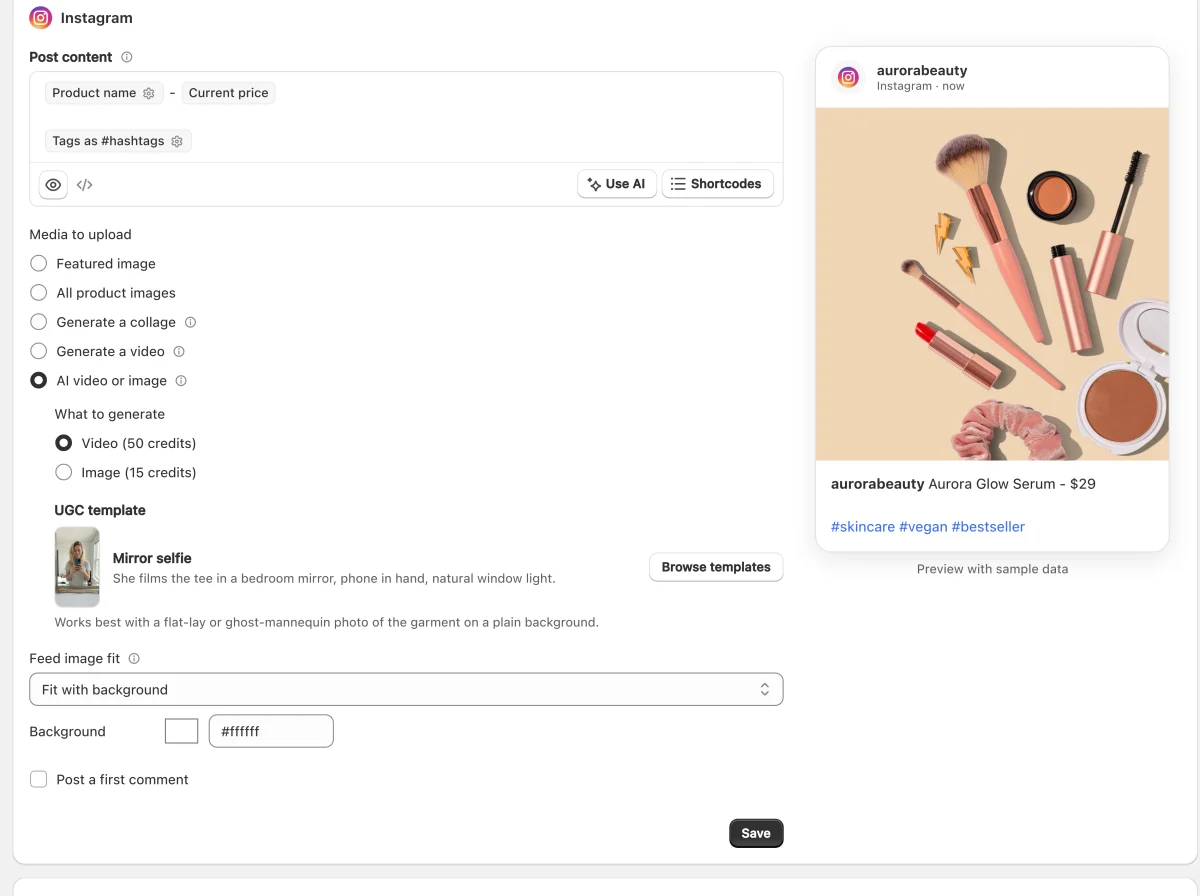
Two kinds of video, for two different jobs. A product video is built from a product's own photos: 9:16, 1080 by 1920, at least ten seconds, fifty templates and a music library, with no AI and no credits. An AI clip is five seconds of a person wearing your garment, and it costs credits. The first fills a schedule; the second is the one that looks like a creator made it.
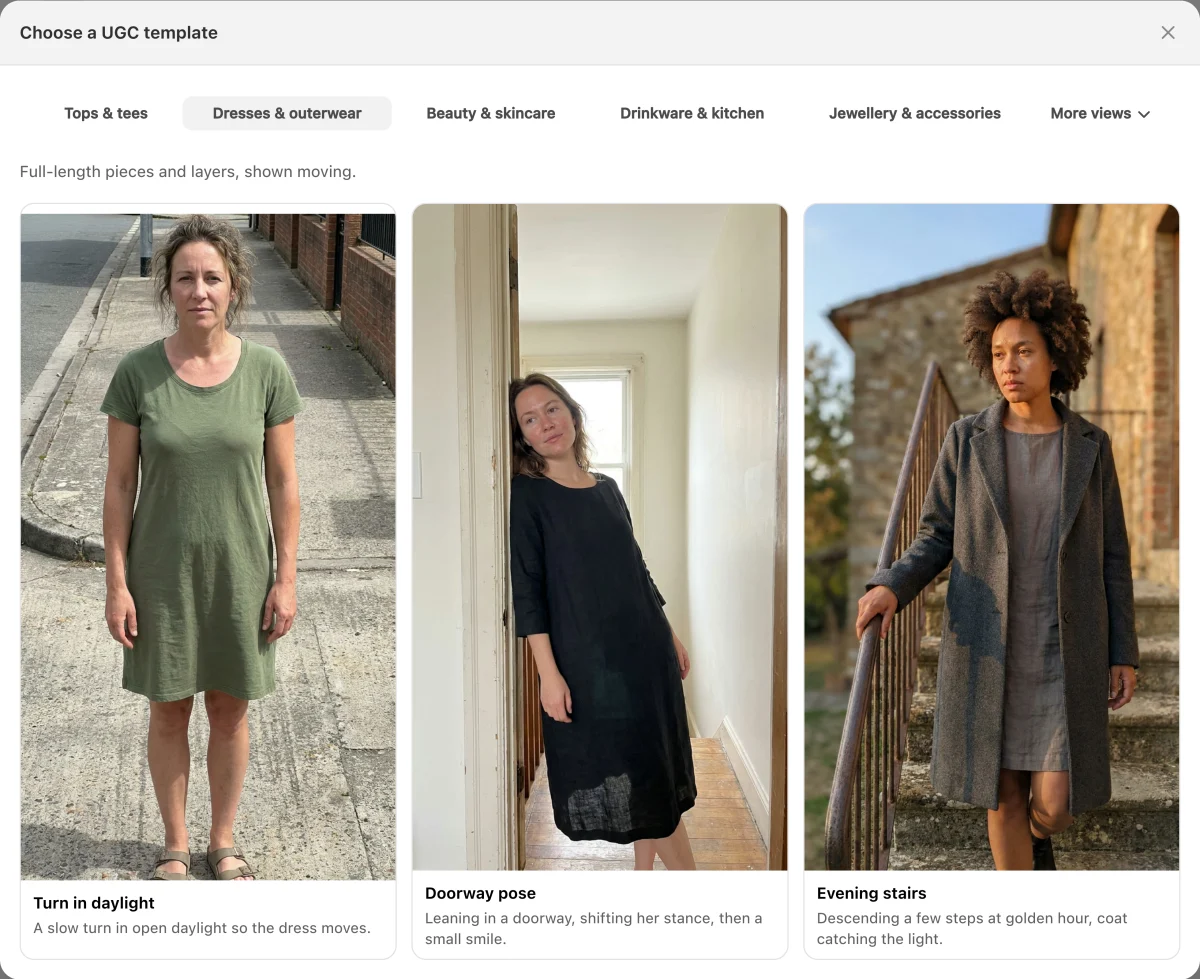
Six clothing scenes. A mirror selfie, a street walk and a café table for tops and tees; a turn in daylight, a doorway pose and evening stairs for dresses and outerwear. You send a flat lay or a ghost-mannequin photo of the garment, and the try-on model puts it on the person.
Planners keep the schedule full. A planner picks products matching a collection, tag, type or vendor and posts them on a schedule, in random order, without repeating until it has been through the set, skipping anything out of stock. Pointed at this season's collection it keeps clips going out between the ones you film yourself.
Five limits worth knowing before you rely on any of it:
- An AI clip is five seconds and one shot. It is a scene, not an edit. Nothing here cuts between angles, adds text on screen or lays your voice over it.
- It costs credits. Fifty per clip, fifteen for the same scene as a still, from a monthly allowance of 50 on Free, 250 on Starter, 700 on Growth and 1,500 on Pro, which also pays for AI captions at one credit each.
- Product videos are not on the free plan. They start on Starter, at 50 a month, then 150 on Growth and 250 on Pro.
- Anything published through an app is capped shorter than the app itself. Instagram's publishing API takes a Reel up to fifteen minutes and 300 MB, which is far past anything this post recommends, but it is not the twenty minutes you get filming inside Instagram.
- Generated clips get labelled. Posts carrying an AI clip have a "Created with AI" line added to the caption by default. You can reword it or switch it off in Settings, and the next section is why you should think hard before switching it off.
The free plan publishes real posts rather than previews, and the Instagram documentation is at yoomru.com/documentations. The general network walkthrough, not specific to clothing, is how to promote Shopify products on Instagram.
Labelling a clip that was generated
TikTok is explicit: content that uses AI to show realistic-looking people or scenes has to be labelled, and unlabelled content can be removed, restricted or labelled for you. If you cross-post your Reels to TikTok, and you should, that rule reaches you. Meta is looser for ordinary product content, applying an "AI info" label of its own when it detects the provenance data generators embed in a file. Read that as a reason to label anyway: a generated clip that arrives labelled reads as confident, and the same clip found out later does not.
The rules that actually bite in apparel are not about AI at all. Advertising law in most markets says an image must not mislead about the product, and a disclosure does not fix a misleading image. The full version of that argument, including where the line sits for AI models, is in how to photograph clothing without a model.
Before you post a Reel
- It is 9:16 and fills the screen.
- The first frame already shows the garment.
- There is text on screen that works with the sound off.
- The size worn and the height of the person are stated somewhere.
- Nothing important sits in the top or bottom strip of the frame.
- The cover frame is one where the piece is sharp and centred, because you cannot change it later.
- The caption names the piece so someone can actually find it.
- There is sound.
- Anything AI generated is labelled.
FAQ
How long can an Instagram Reel be?
Up to twenty minutes, but that is not the number to plan around. Instagram says a Reel longer than three minutes will not be recommended to new audiences, so three minutes is the practical ceiling for anything meant to find new customers. For clothing, seven to fifteen seconds covers most of it.
Why are my Reels not getting views?
Usually because the first second gives a stranger no reason to stay, and sometimes because the numbers were never as big as you assumed. A small account averaging a few hundred views per Reel is in the normal range, not in trouble. Fix the opening frame, post more often, and judge over a month.
Do Reels get more reach than a carousel?
Not in raw views. Benchmark studies find carousels out-view Reels at most account sizes, because they get a second pass through your followers' feeds. What Reels do is reach people who do not follow you, which is a different and, for a growing brand, more valuable thing.
Do I have to be on camera?
No. Hands, a rail, a table and a garment carry most of the formats in this post, and packing clips need nothing but your hands. Being on camera helps, because people buy clothes from people, but it is not the entry requirement.
Can I post the same Reel to TikTok?
Yes, and you should. Same 9:16 footage, and it is a free second and third audience with YouTube Shorts. Change the caption, since each place reads a little differently, and remember that TikTok expects an AI label where Instagram may not.
How many Reels a week should a clothing brand post?
Two to four, held steadily, beats seven for a fortnight and then nothing. Consistency is the variable you control; reach is not.
Do hashtags still matter on Reels?
A little, and much less than the first second of the clip. There is even evidence that posts carrying hashtags average fewer views than posts without. A few specific and relevant ones are fine; thirty generic ones are wasted effort.
What do I do when I have nothing filmed?
Animate what you have. A branded product video from the photos on your product page, or a generated on-model clip, fills the slot without pretending to be something it is not. The routes are compared in how to photograph clothing without a model.