
 Facebook
 Instagram
 X (Twitter)
 TikTok
 Pinterest
 YouTube
 LinkedIn
 Threads
 Google Business Profile
 Telegram
 Discord
How to Market Home Decor Products on Social Media: A Guide for Small Shops



A lamp, a vase or a throw pillow photographed alone on a white background answers only one question: what is this. It does not answer the question a buyer actually has, which is what will this look like in my house. That gap is the whole job of marketing a home decor brand on social media.
The shops that do well close that gap constantly. They show the object in a room, at a size a buyer can judge against their own furniture, in light that looks like a real afternoon rather than a studio. Then they worry about captions, hashtags and how often to post.
This guide covers which channels earn the effort, what to post, how to build room scenes without hiring a stylist or a photographer, seasonal timing that actually matches how people buy decor, and a weekly workflow you can keep up alone. Yoomru, the app we make, appears near the end where it is relevant, and we say so clearly.
Quick answer
Put Pinterest first, Instagram second, and treat the rest as a bonus. Post the object styled in a room far more often than the object alone. Build content around rooms and moments (a reading corner, a housewarming gift, a Sunday reset) rather than SKUs, because that is how people actually search for and save home decor.
| Channel | Why it matters for home decor | Realistic effort |
|---|---|---|
| People plan whole rooms on it, months before they buy. A pin keeps earning saves and clicks long after you post it. | Highest return per hour. Pin most days. | |
| Reels and carousels carry styling shots, before-and-afters and shelf tours. | Three posts a week, plus Stories. | |
| TikTok | Unboxing, styling and "get ready with me for a room refresh" clips travel well here. | Two clips a week, if you enjoy being on camera. |
| Albums, restock notices, local pickup and an older buyer who still browses there. | Two posts a week, mostly reshared from Instagram. | |
| Google Business Profile | Only if you have a showroom, studio or market stall people can visit. | Occasional. |
Why home decor is different from other products
Clothing has a body to hang on. Jewelry has a hand to sit in. A vase or a lamp has neither, so the burden of context falls entirely on the room around it. A candle photographed on a table with nothing else in frame could be any size, any style, any price. The same candle on a coffee table next to a book and a half-full mug is a specific size, a specific mood and, most importantly, a specific kind of room the buyer can picture as their own.
That is also why home decor leans so hard on Pinterest specifically. Someone planning a living room refresh searches "neutral living room shelf styling" the way someone planning a wedding searches "spring wedding centerpiece," and they save dozens of pins before buying anything. A product photographed only on white never enters that search at all, no matter how good the object is.
Decor also sells on a longer, quieter timeline than most Shopify categories. A phone case gets bought on impulse; a coffee table or a wall shelf gets saved, revisited and compared against three other options over weeks. That means the job of a decor post is often not "buy now" but "remember this exists when you are ready," which favors channels built for saving something for later (Pinterest boards, Instagram Saves, a wishlist) over channels built for immediate reaction.
The category also sells well in sets. A single ceramic vase is a fine product; a vase, a matching tray and a candle styled together on the same shelf is a story, and it gives you three products' worth of content from one styling session. Plan posts around small groupings from your catalog, not just one SKU at a time, and cross-link the products in the caption.
Lighting is a smaller but real difference too. Studio product photography aims for neutral, even, slightly cool light because it needs to show true color for the product page. A styled room shot works better warmer and a little uneven, the way a real living room actually looks at four in the afternoon, because that warmth is doing the emotional work a studio shot deliberately avoids. If you are shooting these yourself, resist the instinct to bring studio lighting into the room scene; the imperfection is the point.
Where to put your effort, channel by channel
Pinterest rewards volume and vertical images more than any other channel here. Pin every product in at least one styled setting, and pin the same product again later in a different room or season; Pinterest does not punish repeats the way Instagram's feed does. Rich pins that link straight to the product page shorten the path from save to checkout. See our guide to home decor on Pinterest for pin sizing, boards and descriptions worth the extra minute.
Instagram is where the story behind the styling lives: a reel of a shelf being built up piece by piece, a carousel of "3 ways to style one vase," a Reel of a room before the product and after it. Stories are a good place for restock notices and quick behind-the-scenes shots that do not need to be polished.
TikTok works when you are willing to be the person on camera, unboxing and placing things while talking. It is less forgiving of a silent product shot than Instagram, so treat it as optional rather than core.
Facebook still has a real audience for home goods, especially anything with a nostalgic or handmade angle, but it is a reshare channel: post to Instagram first, then push the same asset to Facebook rather than creating for it directly.
A word on boards specifically, since Pinterest is doing most of the work here: organize boards by room and by style ("Neutral living rooms," "Small apartment shelves") rather than by your own product categories. A buyer thinks in rooms, not in SKUs, and a board named after your collection ("Autumn Collection") means nothing to someone searching Pinterest for ideas, while "Cozy reading corner" gets found by exactly the person shopping for what you sell.
What a home decor store actually posts
- The object styled in a room. Not a full magazine spread, just enough surrounding furniture and light to place it: a lamp on a real side table, a vase on a real shelf, a throw folded on a real sofa arm.
- Scale references. A hand next to the object, or the object beside something the viewer already knows the size of, answers "how big is this really" before anyone has to ask in the comments.
- Before and after. A corner of a room, empty or plain, then the same corner with the product in it. This single format does more persuading than any caption.
- Material and texture close-ups. Decor sells on how it feels as much as how it looks; a close crop on the ceramic glaze or the weave of a throw tells a buyer what a flat product photo cannot.
- Reviews with photos. A customer's own (messier, more real) room with your product in it is often more convincing than your own styled shot, because it proves the object survives contact with an actual home.
- Small groupings. Two or three products styled together, with each one tagged or linked, gives a buyer a reason to add more than one item to the cart and gives you more content per photo session.
- Care and durability notes. "Dishwasher safe," "fades resistant fabric," "how to clean the finish" posts answer the practical objection that stops a decor purchase more often than price does.
- The maker's hands, if you make it yourself. Handmade decor sells partly on the story of being handmade; a short clip of the actual making process outperforms a finished-product shot for a buyer deciding between you and a mass-produced alternative.
Room styling, the asset that does the most work
The problem is not knowing this. It is that styling a room, lighting it well and shooting it takes a stylist, a space and an afternoon most small decor shops do not have for every single product. A ten-product catalog might get a real shoot for its two or three hero pieces and nothing for the rest, which is exactly backward from what a Pinterest-heavy strategy needs: volume of styled images across the whole catalog, not depth on a handful.
This is where an AI-generated mockup earns its keep: it cannot replace a real customer photo, but it turns a plain product photo into a placed-in-a-room image in minutes, for every product in the catalog, not just the handful worth a real shoot.
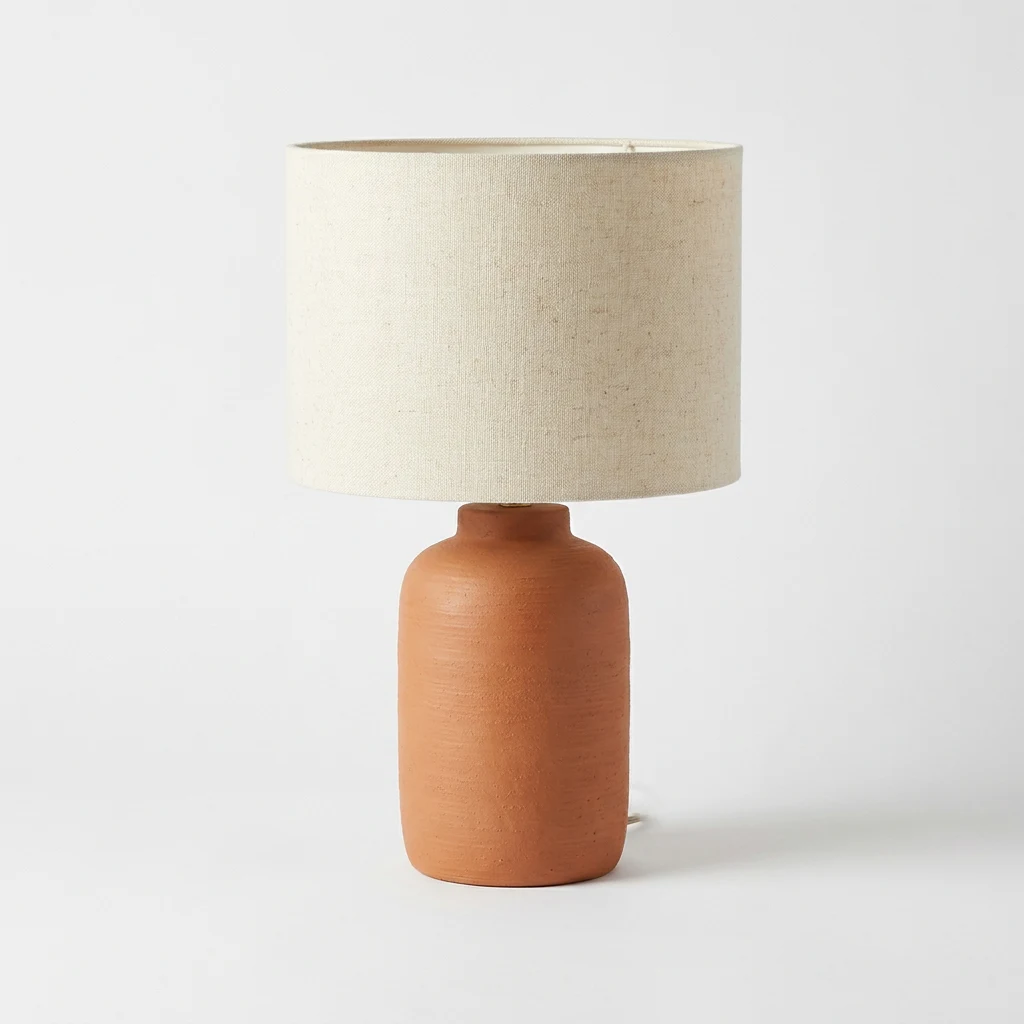

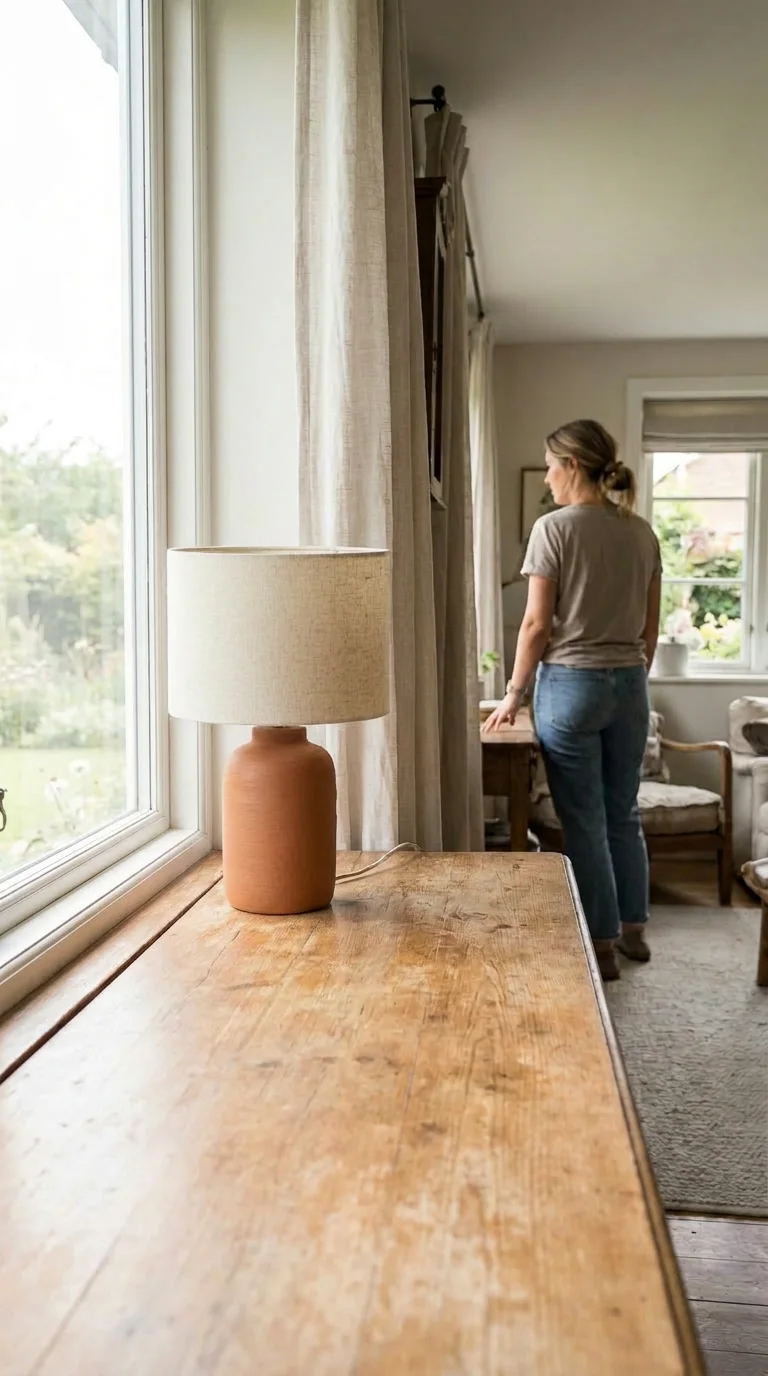
Same product, same shape and color in every frame, three completely different rooms and moods. None of this required a studio, a stylist or a model booking, and the difference between the first image and the other two is the difference between a listing photo and a post someone stops scrolling for. If you would rather shoot some of these yourself, our guide to styling product photos for home goods covers the low-cost version: light, angles and props that work with a phone and a real room.
How often to post, and a weekly workflow
| Day | What goes out |
|---|---|
| Monday | Pin 2-3 products in styled settings. Pinterest rewards steady activity more than bursts. |
| Tuesday | Instagram carousel: one product styled three ways, or a small shelf/ |
| Wednesday | Pin again. A repeat of an earlier pin in a new room counts as fresh content here. |
| Thursday | Instagram or TikTok reel: a before-and-after, or the object being placed and adjusted. |
| Friday | A review card or a customer photo, reshared with credit. Weekend browsing starts here. |
| Weekend | Stories only: restocks, a peek at what is coming, a quick styling tip. |
None of this needs to be live. Building a week of posts on a Sunday evening and letting a scheduler carry it through is the difference between decor marketing being a chore and being something that runs by itself.
The order above is a starting point, not a rule. If your catalog leans heavily on one or two hero products, a realistic version of this schedule repeats those products across three or four different styled settings rather than trying to cover the whole catalog every week; better to make one lamp look irresistible in five rooms than to show fifty products once each and none of them well. If you carry a wide, changing catalog instead, the opposite applies: rotate through more SKUs at a shallower depth per product, and lean on collections and small groupings to keep the volume up without repeating the same hero shot.
Whichever shape fits your catalog, batch the actual creative work. Generate or shoot a month of styled images in one sitting, write captions in one sitting, and let the schedule carry the posting. Doing all three at once, every single day, is the pattern that makes small stores quietly stop posting after a few weeks.
Seasonal timing
Home decor has more good seasons than most categories, which is easy to under-use if you only think in terms of the big holidays.
- January. "New year, new room" content performs well before the holiday decorations even come down; people are already planning the refresh, and a decluttering or minimalism angle sells particularly well against the general new-year mood.
- Spring. Moving season and spring cleaning both drive decor searches, especially anything neutral, light or easy to clean. This is also when a lot of first-time buyers are furnishing a place of their own for the first time, so beginner-friendly framing ("starter decor that still looks intentional") does well.
- Back to school. Dorm and first-apartment decor is its own busy window, distinct from the general home audience: smaller scale, lower budget, and content that shows how something looks in a genuinely small space rather than a spacious living room.
- Housewarming, year round. Gift framing ("what to bring to a housewarming," "a gift for someone's first apartment") works whenever people move, which is constantly, and it reaches a buyer shopping for someone else, not for their own home.
- Holiday season. Gift guides and hosting-focused styling (a tablescape, a mantel, a cozy corner for guests) peak here, but start pinning six to eight weeks ahead of the season; Pinterest's own search volume for holiday decor climbs well before Instagram's does, and a pin posted the week of the holiday has already missed most of its own audience.
Mistakes to avoid
- Posting only white-background product shots. They belong on the product page, not carrying your feed; save them for the second or third slide of a carousel, not the cover.
- Over-styling every single shot. A perfectly art-directed flat lay for every product is exhausting to produce and, past a point, starts to look staged rather than aspirational. A few real, slightly imperfect rooms build more trust than an endless run of magazine spreads.
- Ignoring scale entirely. Decor is one of the categories most likely to be returned over "smaller than I expected." A post that never shows scale is setting up a return, not a sale.
- Treating Pinterest like Instagram. A square Instagram crop reposted to Pinterest as-is under-performs a proper vertical pin badly enough that it is worth the extra minute to re-crop.
- Only posting new arrivals. Decor is evergreen in a way apparel is not; a candle holder from months ago in a new seasonal setting is a legitimate new post, not a rerun.
Where Yoomru fits
Yoomru connects to your Shopify catalog and posts to Pinterest, Instagram, TikTok, Facebook and seven other networks from one place, so building the weekly workflow above does not mean logging into five apps. Two features matter specifically for home decor:
- AI UGC scenes. Pick a product, pick a room setting (a shelf, a sofa corner, a windowsill), and Yoomru composites your exact product into that scene in minutes, the same technique behind the mockups above. It works from the plain product photo you already have.
- Planners. Set a planner to pull from your home decor collection on a schedule, and it keeps posting on its own; you check in weekly rather than posting daily by hand.
Both are available from the free plan for a limited monthly allowance, with more on paid plans. Neither replaces a real photoshoot for your hero products, and neither should; the point is covering the long tail of your catalog that would otherwise sit with a single flat product photo and nothing else, indefinitely.
Checklist before you post
- Is the object shown in a room, not just on white, at least as often as it is shown alone?
- Is there something in frame that tells a viewer the actual size?
- Does the caption describe a room or a moment, not just the product name and price?
- Is this going to Pinterest, in a vertical crop, with a link back to the product?
- If this is seasonal, is it going out early enough to catch the planning window, not the week of?
FAQ
Do I need a real styled photoshoot at all? Eventually, yes, for your best sellers. But you do not need one for every product before you can post convincingly; AI-generated room mockups cover the rest of the catalog in the meantime.
How many rooms or styles should one product appear in? Two or three is enough to show range without diluting the product's identity. A minimalist lamp shown in a maximalist room every time will confuse buyers about what it actually looks like in a plain space.
Is Pinterest really worth it for a small shop? Often more than Instagram, because Pinterest pins keep surfacing in search for months, while an Instagram post's reach mostly ends within days. For home decor specifically, this compounds: seasonal pins keep earning the next time that season comes around.
What if I sell decor that is hard to photograph in a "normal" room, like outdoor or garden pieces? The same logic applies with a garden or patio setting instead of a living room. Scale and context matter more than the specific room.
Should I show my actual home, or a generic styled space? Either works, but consistency matters more than which one you pick. A recognizable "look" across your posts, whether that is your real home or a repeated style of mockup, is what makes a scroll of your feed read as one brand rather than a stock photo grab bag.
How do I handle products that only make sense as a set, like a full dinnerware collection? Post the set styled together for the main shot, then give the individual pieces their own close-up posts afterward; that order matches how a buyer actually decides, seeing the whole picture before choosing which pieces they can afford.
Do video posts matter for decor the way they do for clothing? Less for movement, since a vase does not move the way fabric does, but a short clip of a hand placing or adjusting the object still outperforms a static photo, because it implies scale and touch in a way a still image cannot.