
 Facebook
 Instagram
 X (Twitter)
 TikTok
 Pinterest
 YouTube
 LinkedIn
 Threads
 Google Business Profile
 Telegram
 Discord
Xyla AI Review (2026): Features, Pricing, Pros & Cons


Is Xyla AI Social Media Autopilot actually free, or will you end up locked out the moment you try to post? Which plan gives you real value without burning through a credit pool every month? These are the questions merchants ask before committing to a Shopify social app, and this Xyla AI review answers them: what it actually delivers on each plan, where it runs into real limits, and what alternatives make sense when it falls short.
See how this app compares to all other Shopify social auto-post apps in our complete guide to the best shopify social media auto-post apps.
I installed Xyla AI on a Shopify demo store, walked through its full 6-step onboarding wizard, connected Instagram, Facebook, and Pinterest, and reviewed the week of content it auto-generated before any publishing was triggered. I also read its App Store listing in full and reviewed all available public merchant feedback. The gap between Xyla AI's listing promises and its in-app reality is wider than most expect.
What Is Xyla AI?
Xyla AI Social Media Autopilot is developed by Xyla AI, based in London, UK. It launched on the Shopify App Store on December 26, 2023. The app describes itself as an AI social media autopilot and claims to be trusted by 10,000+ Shopify stores.
Its core pitch goes beyond standard product posts: alongside promotional content, it generates fun facts, famous quotes, holiday posts, memes, quizzes, and engagement content, with the goal of keeping your social feed varied enough that it does not look like a product dump. Content generation runs in 93 languages.
One important architectural detail: Xyla AI is not embedded inside your Shopify admin. After installing from the App Store, the app opens at app.xyla.ai as an external SaaS application. Its Shopify API integration is solid (it correctly read our demo store's product catalog, including product types, without needing a public storefront), but the working environment is outside Shopify, not inside it.
Xyla AI Review Quick Verdict
Xyla AI has the most polished onboarding experience in the Shopify social auto-posting category. The content variety beyond plain product posts is a genuine differentiator. The catch: publishing anything requires starting a paid trial, the free plan is preview-only with a watermark, all five premium AI visual types are credit-gated behind the $39/mo Pro tier, and the network count (6 in-app) falls short of what the listing implies.
| Criteria | Verdict |
|---|---|
| Best for | Merchants who want a fast, structured setup and a diverse AI content mix beyond product posts |
| Not ideal for | Merchants who want to publish without a paid subscription; stores needing LinkedIn, Google Business, Telegram, or Discord |
| Starting price | $29/ |
| Free plan / trial | Free = preview-only, no publishing; paid plans include 7-day trial |
| Networks supported | 6 confirmed in-app (Instagram, Facebook, TikTok, X/ |
| Most valuable features | 6-step onboarding wizard, background weekly content generation, content type variety, 7 brand voice presets |
| Ease of use | 8/ |
| Feature richness | 7/ |
| Reliability | 7/ |
| App Store rating | 4.7 / 5 from 190 reviews; Built for Shopify: No |
Xyla AI Features and Functionality
Xyla AI covers more ground than a standard product-posting app. Here is what I found across the listing, onboarding, and in-app UI.
1. Onboarding Wizard and Brand Kit
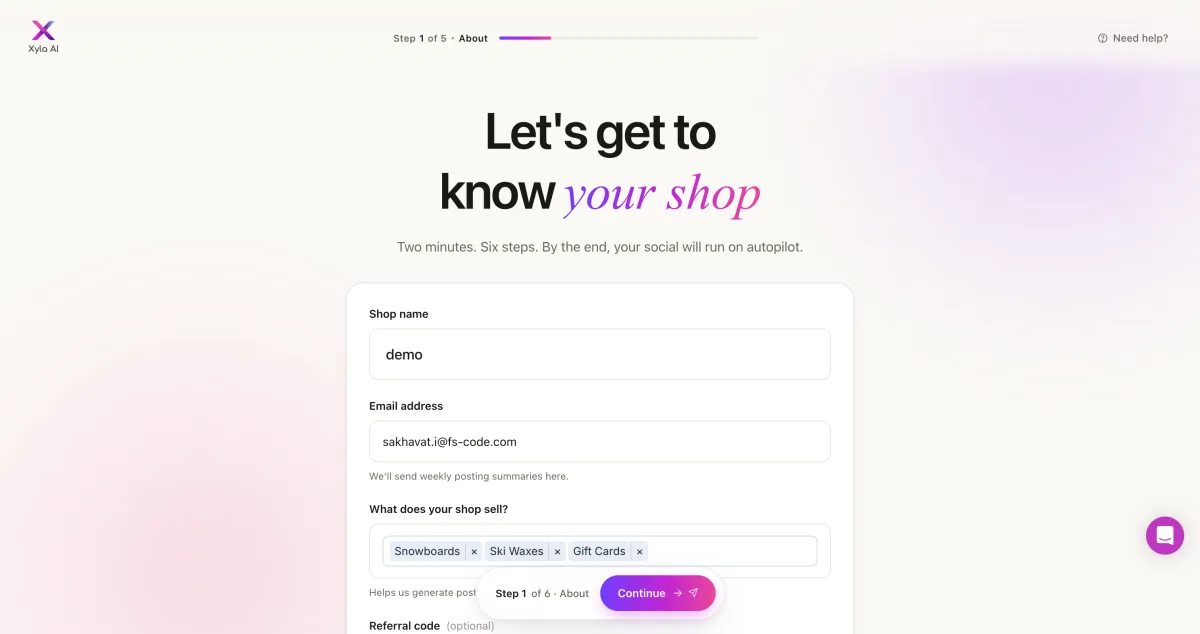
The 6-step onboarding wizard is the strongest first-run experience in the category. It walks you through product types, posting schedule, brand voice, target customer profile, content preferences, and social channel connection. The wizard pre-populates your product types directly from your Shopify catalog via the API. In our test, it correctly identified the store's product categories without any manual input. Once setup is complete, Xyla starts generating a full week of posts in the background automatically.
2. Content Type Variety
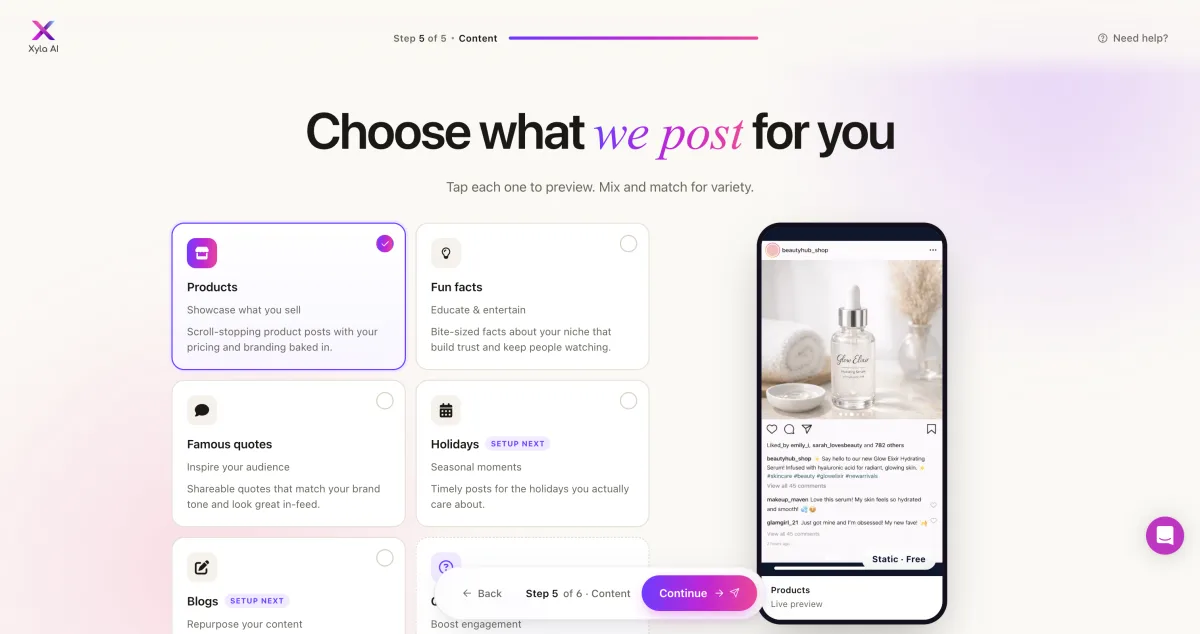
Xyla generates six post types, not just product promotions:
- Products: standard promotional posts from your catalog
- Fun facts: educational or entertainment posts about your niche
- Famous quotes: branded inspirational content
- Holidays: seasonal and observance-day posts
- Blogs: content pulled from your Shopify blog
- Engagement posts: conversation-starters and interaction prompts
This variety is one of Xyla's real strengths. Feeds built exclusively on product posts tend to feel repetitive; a rotating mix of content types keeps engagement from dropping off.
3. AI Visual Types
Xyla offers five AI visual formats. All five are gated to the Pro plan ($39/mo) and consume AI credits:
- Enhanced images: AI-polished product photos
- Cinematic video: video generated from product imagery
- UGC videos: AI influencer/model content featuring your products
- Product videos: animated product ads
- Stories and guides: vertical-format content for Instagram Stories
On the Free and Growth plans, all five are visible in the setup wizard but locked behind a "Pro" badge. In our live test, the product ad visuals were generally accurate, but the UGC video format used generic AI people with no connection to the actual store brand. One result for a snowboard store showed a woman holding a gift card in a hallway. Some AI-generated headlines were also off-message.
4. Brand Voice and Captions
Seven preset brand voices are available on Free and Growth plans: The TikToker, The Hype Master, The Connoisseur, The Trendsetter, The Professional, The Joker, and The Authority. Custom brand voice, where you define your own tone parameters, is a Pro-only feature. Content generates in 93 languages.
A "Not quite right?" feedback button on each generated post lets you signal dissatisfaction and retrain the AI on individual posts.
5. Autopilot Scheduling and Approval
Once setup is complete, Xyla runs fully automated: it generates and schedules content continuously without requiring any manual input. A review-first option (pre-publication approval mode) is available for merchants who want to check posts before they go live. A schedule view shows all upcoming posts, which can be edited, deleted, or approved individually.
6. Analytics
Analytics appears in the in-app navigation labeled "NEW," indicating it was recently added. Tier availability was not confirmed in our research pass. Merchants evaluating Xyla for reporting should verify the current availability per plan with the listing before purchasing.
Networks Supported
I confirmed available networks via the channel connection screen after completing the onboarding wizard. Xyla AI supports 6 networks:
| Network | Available | Notes |
|---|---|---|
| Yes | Feed posts on all plans; Stories on Pro+ | |
| Yes | All plans | |
| TikTok | Yes | All plans |
| X (Twitter) | Yes | All plans |
| Yes | All plans | |
| YouTube | Yes | All plans |
| Instagram Shopping tags | Scale only | |
| No | Absent from in-app connect screen | |
| Google Business Profile | No | Not offered |
| Telegram | No | Not offered |
| Discord | No | Not offered |
| Threads | No | Not offered |
The App Store listing describes Xyla as supporting "7+ networks." The in-app channel connection screen shows 6. LinkedIn does not appear on any plan. If LinkedIn, Google Business, Telegram, Discord, or Threads are part of your marketing, they are not available here.
Xyla AI Ease of Use
Xyla AI earns an 8/10 for ease of use. The onboarding experience is the strongest in the category, and the overall learning curve is low once you are past setup.
Onboarding: The 6-step wizard is clear, well-sequenced, and pre-populated with real data from your Shopify catalog. It is the most merchant-friendly onboarding I encountered across all nine apps tested. Immediate background content generation after setup creates a genuine "it works" moment within minutes.
Dashboard clarity: The post-setup dashboard is clean. Upcoming posts are displayed in a schedule view; each post can be previewed, edited, or removed before it publishes.
External SaaS friction: The app opens outside Shopify admin at app.xyla.ai. This is a minor workflow interruption for merchants who prefer to manage everything within Shopify, but not a dealbreaker once you are familiar with the interface.
Free plan confusion: The preview-only free plan with a watermark, combined with the requirement to start a paid trial before publishing anything, created confusion for some merchants in public reviews. The limitation is real, but it is not prominently communicated during onboarding.
Approval control: The review-first option is available for merchants who want to gate every post before it goes live, which helps with brands that need content approval.
Xyla AI Performance and Reliability
Xyla AI earns a 7/10 for performance and reliability, based on our live testing and public review patterns.
Product sync accuracy: The Shopify API integration read our demo store's catalog correctly without requiring a public storefront. Product types, product names, and catalog structure were all accurately identified, which is better than several competitors where sync failed entirely or required a public storefront.
Product ad visual accuracy: For the standard product ad format, several merchants confirmed accurate representation of their products, and our test produced reasonably faithful product visuals for this content type.
UGC video accuracy: The UGC format uses AI-generated influencer/model figures. In our live test, these were generic AI people unrelated to the store's brand or products. This matches the complaint pattern in public reviews. If UGC-style content is a priority, the output consistency varies.
Caption quality: Some AI-generated headlines were abstract or off-message (for example, "PLAY SENSORY - Hear The Snow Sizzle" on a snowboard store post). This was reproduced in our own test. The "Not quite right?" feedback button exists to retrain the AI when this happens, but it requires ongoing manual oversight.
Auto-posting reliability: Publishing itself was trial-locked during our test. The 4.7 rating on 190 reviews suggests the auto-posting engine works reliably for the majority of users once activated.
Xyla AI Support and Documentation
Specific support channels (in-app chat, email, help docs) were not confirmed in our research pass of the listing and in-app UI. The App Store listing does not explicitly surface a support contact method in its visible content.
What the review signal indicates: with a 4.7 rating on 190 reviews and 85 percent five-star feedback, the overall merchant experience, including support satisfaction, appears positive. No notable cluster of support complaints appeared in public reviews.
Xyla AI is based in London and operates under EU/GDPR compliance (Usercentrics cookie consent is shown on first app load), which may be relevant for merchants with European customers.
Xyla AI User Reviews and Reputation
I reviewed all available public reviews on the Shopify App Store listing (190 reviews, fetched 2026-08-07). Here is what merchants actually say.
Rating breakdown: 4.7 overall. 85 percent five-star, 11 percent four-star, 2 percent three-star, 1 percent two-star, 1 percent one-star. This is a strong rating with very low dissatisfaction at the lower end.
What merchants praise:
Time savings are the most consistent theme. Merchants describe genuine relief from daily social media work:
"Fully automated professional-looking posts save hours weekly. Big time-saver with hands-off operation."
For product ad visuals, some merchants specifically highlight that Xyla got their products right, which is not guaranteed across the category:
"This is the first one that actually displayed my shirts correctly. The designs were identical and the text." (June 2026)
Improved social traffic is a third consistent theme, with merchants attributing consistent posting cadence to measurable engagement growth.
What merchants complain about:
AI content accuracy is the primary complaint pattern. UGC-style visuals in particular tend to miss the brand:
"AI produces inaccurate and irrelevant descriptions. UGC videos use generic AI humans unrelated to brand."
Some merchants found the setup unclear, particularly around the free plan's publishing limitations:
"Setup process was unclear from the start." (July 2026)
Traffic without sales conversion is a recurring theme:
"I am not getting any sales despite good traffic and professional-looking ads." (July 2026)
This is a category-wide pattern rather than a Xyla-specific flaw, but it is worth noting as a realistic expectation.
Limited customization control also appears:
"Limited ability to customize generated content. Not enough control over what gets posted."
Xyla AI Pricing and Value
Xyla AI has four tiers. Annual billing saves approximately 40 percent. All paid plans include a 7-day free trial.
| Plan | Monthly | Annual (per month) | Posts/ |
AI Credits |
|---|---|---|---|---|
Free |
$0 |
- |
Preview only |
0 |
Growth |
$29/ |
$17/ |
30 |
100 |
Pro |
$39/ |
$23/ |
90 |
500 |
Scale |
$60/ |
$36/ |
Unlimited |
1,500 |
The free plan is preview-only. The single most important pricing detail: the free plan generates content and shows watermarked previews, but publishing a single post requires starting the 7-day trial, which creates a real Shopify subscription. There is no free publishing of any kind.
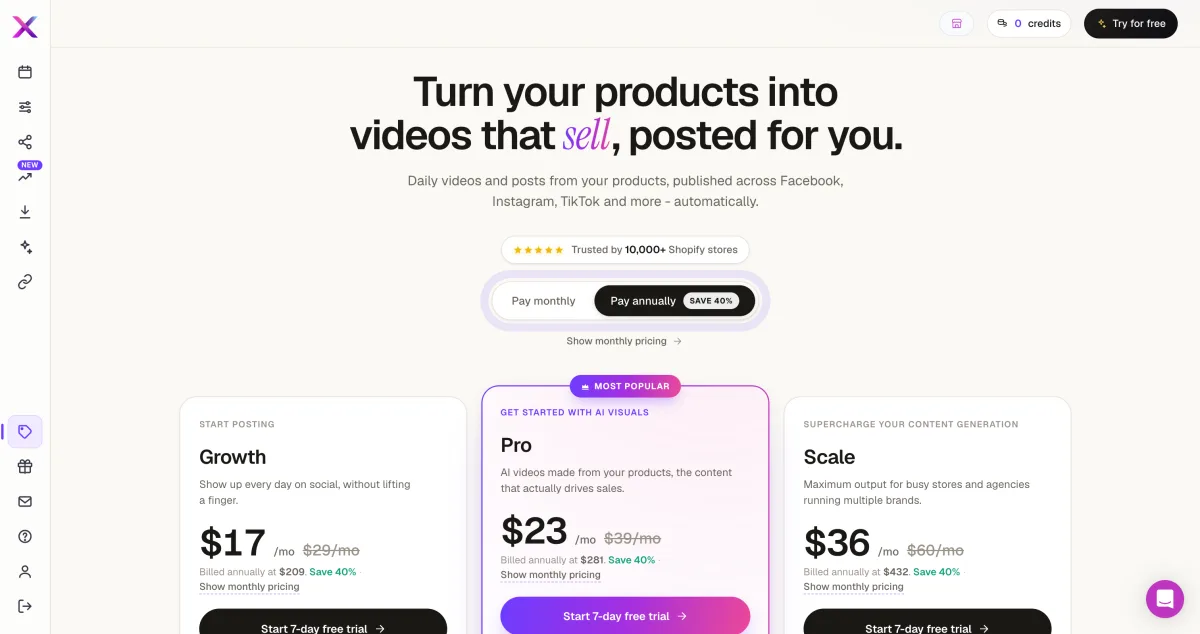
Credits meter all premium AI visuals. All five advanced visual types (Enhanced images, Cinematic video, UGC videos, Product videos, Stories and guides) require Pro or above. Each generation consumes AI credits from the monthly pool (100 on Growth, 500 on Pro, 1,500 on Scale). Once the pool is used, those features are unavailable until the next billing cycle.
Post volume caps are hard limits. Growth is capped at 30 posts per month and Pro at 90. Scale removes the cap.
Value assessment: At $29/mo (or $17/mo annual) Growth, you get 30 posts and 100 AI credits for basic content types. Pro at $39/mo unlocks all five AI visual types but caps posting at 90/mo and provides a limited credit pool (500 per month for all premium visuals). Scale at $60/mo removes those caps. For merchants who want high-volume AI visual content, credit consumption on lower tiers is a real constraint to model before subscribing.
Xyla AI Pros and Cons
Pros
Best-in-category onboarding. The 6-step wizard, Shopify catalog pre-population, and instant background content generation give Xyla the most polished onboarding UX in the category. It is the fastest way to go from install to seeing real generated content.
Content variety beyond product posts. Facts, quotes, holidays, memes, and engagement posts help keep feeds from looking automated. For stores where content variety matters for social performance, this is a genuine advantage.
Strong review base. A 4.7 rating on 190 reviews with 85 percent five-star feedback reflects a product that works reliably for most of its users in practice.
Flexible brand voice options. Seven preset brand voices plus the ability to provide per-post AI feedback give meaningful control over tone without requiring full Pro.
Cons
Free plan does not publish. Publishing any post requires starting a paid subscription. The watermarked preview-only free plan creates a misleading impression for merchants who expect a functional free tier.
All premium AI visuals are credit-metered and Pro-gated. The five AI visual types that make Xyla compelling are all behind $39/mo and consume a finite monthly credit pool. Lower tiers get a restricted credit count.
Only 6 networks confirmed in-app. The listing claims "7+"; in practice, LinkedIn is absent. Google Business, Telegram, Discord, and Threads are also unavailable.
UGC video quality is inconsistent. The influencer/model video format uses generic AI people unrelated to the brand. Some captions and headlines are abstract or off-message. These require manual review to catch.
Who Should Use Xyla AI? / Who Should Skip It
Who Should Use It
Merchants who want instant setup. If getting to a working social media posting schedule in under 30 minutes matters, Xyla's onboarding is the category leader.
Stores that want diverse content, not just product posts. Merchants whose audience responds better to a mix of educational, inspirational, and product content will find Xyla's six content types genuinely useful.
Brands comfortable with a subscription before publishing. If you know you are going to use the app and are willing to start the 7-day trial immediately, the free plan limitations become irrelevant.
Merchants focused on the core six networks. If Instagram, Facebook, TikTok, X/Twitter, Pinterest, and YouTube cover your entire social strategy, Xyla's network coverage is sufficient.
Who Should Skip It
Merchants who want to try before committing. The free plan cannot publish anything. If you want to test real auto-posting before entering a paid subscription, Xyla is not structured for that.
Stores needing LinkedIn, Google Business, Telegram, or Discord. These networks are not available on any Xyla plan.
Budget-conscious stores worried about credit burn. On Growth (100 credits) or Pro (500 credits), merchants who generate AI visuals heavily may hit their monthly ceiling before the billing cycle ends.
Brands where accurate AI lifestyle imagery matters. If UGC-style influencer content is a core use case and you need it to represent your actual brand, the generic AI model output is a documented limitation.
Best Xyla AI Alternatives
If Xyla AI's preview-only free plan, 6-network ceiling, or credit-metered AI visuals are concerns, the two strongest alternatives are Yoomru (Shopify App Store), which covers 11 networks with real free publishing and no monthly credit pool, and Outfy, which has the widest video format variety and a genuine free plan with 459 reviews and a 4.8-star rating. For a full comparison of every option, see the Xyla AI alternatives guide.
Final Verdict: Is Xyla AI Worth It?
Xyla AI is a well-made Shopify social auto-posting app with one stand-out strength: its onboarding experience. The 6-step wizard, instant background content generation, and diverse content type library create a genuinely impressive first-run moment that most competitors cannot match. For merchants who want to be up and auto-posting quickly, with a varied content mix that goes beyond product images, it delivers.
The core caveat is the pricing structure. The free plan's preview-only limitation is the most common source of merchant confusion, and the credit system on Growth and Pro plans means heavy users of AI visual content can hit their monthly ceiling faster than the tier pricing suggests.
If your social strategy fits within Xyla's 6 networks and you are comfortable entering a paid subscription on day one, Xyla is worth it. If you need LinkedIn, Google Business, Telegram, or Discord, or if you want to test real publishing before subscribing, look at the alternatives above, starting with Yoomru.
Xyla AI FAQ
Is there a free version of Xyla AI? Yes, but it is preview-only. The free plan lets you generate content and see watermarked previews; it cannot publish a single post. Publishing requires starting the 7-day trial, which creates a real Shopify subscription on the Growth ($29/mo), Pro ($39/mo), or Scale ($60/mo) plan.
Does Xyla AI support LinkedIn? No. The Shopify App Store listing describes Xyla as supporting "7+ networks," but the in-app channel connection screen shows 6 networks: Instagram, Facebook, TikTok, X/Twitter, Pinterest, and YouTube. LinkedIn is not present in-app on any plan.
How do Xyla AI credits work? AI credits unlock the five premium visual types (Enhanced images, Cinematic video, UGC videos, Product videos, Stories and guides) on Pro and Scale plans. Each content generation uses credits from your monthly pool (100 on Growth, 500 on Pro, 1,500 on Scale). Once credits run out, those visual types are unavailable until the next billing cycle. Standard product posts and the basic content mix do not consume credits.
What are the best Xyla AI alternatives for Shopify? The strongest alternatives depend on what Xyla lacks for your store. For more networks, a real free plan, and no credit system, Yoomru covers 11 networks (including LinkedIn, Telegram, and Discord) and lets you publish 30 posts per month for free without starting a trial. For more video format variety and a mature review base, Outfy (4.8/459 reviews) is worth a look. For a lower-cost entry with Shopify-embedded automation, VibeFlow starts at $8.99/mo.
Is Xyla AI suitable for a brand-new Shopify store? It can be. The onboarding is fast, the content variety works for stores with limited posting history, and the Growth plan ($17/mo annual) is accessible. The main consideration for new stores: the free plan will not let you publish until you start the trial, so you will need to commit to a subscription before seeing a real post go live. Merchants who want to validate the auto-posting output before paying may find that friction frustrating.