
 Facebook
 Instagram
 X (Twitter)
 TikTok
 Pinterest
 YouTube
 LinkedIn
 Threads
 Google Business Profile
 Telegram
 Discord
VibeFlow Review (2026): Features, Pricing, Pros & Cons


Is VibeFlow the right app to auto-post your Shopify products to social media, or will the daily posting cap slow you down before you even notice? Which plan actually makes sense for a small store, and what happens if you need LinkedIn? These are the questions I see most from merchants comparing social auto-posters, and this VibeFlow review answers them based on real testing.
See how this app compares to all other Shopify social auto-post apps in our complete guide to the best shopify social media auto-post apps.
I installed VibeFlow on a Shopify demo store, walked through the full composer and automation flow, and published a live post to Facebook on the free plan. I also read the App Store listing in full and reviewed every public App Store review. Here is what I found.
What Is VibeFlow?
VibeFlow (listed as "VibeFlow - Social Auto Post") is a Shopify-embedded social media auto-poster built by ValueFly. It launched in April 2023 and runs inside your Shopify admin with no external account or API key required. The core idea is straightforward: connect your social channels, pick a product from your catalog, choose an image, collage, or video template, generate a caption with AI, then post immediately, schedule it, or hand it off to an automation that runs on its own. The developer claims "10,000+ users" on the listing, though this is unverified.
VibeFlow supports six confirmed networks: Facebook, Instagram, Pinterest, YouTube, TikTok, and X. LinkedIn is not available in-app despite what the listing may imply. Pricing spans five tiers from free to $89.99/mo, all with a 7-day trial on paid plans.
VibeFlow Review Quick Verdict
VibeFlow delivers on its core promise: automated, product-accurate social posting for Shopify stores. The automation builder is its strongest feature, the AI captions are genuinely product-bound, and a 4.9-star rating from 75 real reviews confirms the experience holds up across a broad user base. Two limits matter: the hard per-account daily posting cap (2/day on the free plan, up to 10 on top tiers), and the absence of LinkedIn.
| Criteria | Verdict |
|---|---|
| Best for | Small Shopify stores posting to Facebook, Instagram, Pinterest, TikTok, YouTube, or X |
| Not ideal for | Stores needing LinkedIn, Google Business Profile, Telegram, or Discord; high daily posting volume per account |
| Starting price | $8.99/ |
| Free plan / trial | Free plan: 10 posts/ |
| Networks supported | 6 confirmed: Facebook, Instagram, Pinterest, YouTube, TikTok, X (no LinkedIn) |
| Most valuable features | Rule-based automation builder, product-accurate AI captions, hashtag chip selector, template-based video, per-channel editing |
| Ease of use | 8/ |
| Feature richness | 7/ |
| Reliability (from testing + reviews) | 8/ |
| App Store rating | 4.9 / 5 (75 reviews, Built for Shopify: No) |
VibeFlow Features & Functionality
VibeFlow covers the full content-creation-to-publish loop within a clean interface. Feature depth is solid for a 2023-launched app, with a rule-based automation builder that stands out as more sophisticated than most rivals at this price point.
Content Creation Templates
VibeFlow offers three template types: Content (image posts), Collage (multi-image), and Video. Templates pull directly from your Shopify product catalog and support customizable branding, colors, and text with product variables: [PRODUCT_TITLE], [PRODUCT_URL], and [SHOP_NAME]. A caption template library provides pre-built starting points organized by purpose (Hot, Bestseller, New Arrivals, Discount Offers). I found the template system functional and well-organized; selecting a product and applying a template took under a minute.
AI Caption Generation
VibeFlow's AI caption system is product-bound: it pulls the actual product name, category, vendor, and URL from your Shopify catalog rather than generating generic marketing copy. I tested this with a snowboard product and the AI correctly identified the product name, included the exact product URL, and generated a relevant caption. An editable system prompt panel lets you set tone, context, and style before generating. This is a stronger AI implementation than several rivals I tested in the same session.
Hashtag Chip Selector
After AI generates a caption, VibeFlow presents approximately 5 pre-selected hashtag chips alongside around 10 more toggleable options. This is a thoughtful UX detail: you get relevant hashtags without having to type them, and you can swap or add without editing raw text. It saves real time across repeated posts.
Video and Collage Creation
Template-based video creation is available on all plans (local video upload from Starter and above). Collage creation combining multiple product images is built into the composer. AI voiceovers for video posts are included from the Starter plan. One reviewer noted that collage template variety and design quality could be improved, which aligns with this being an area still maturing.
Rule-Based Automation Builder
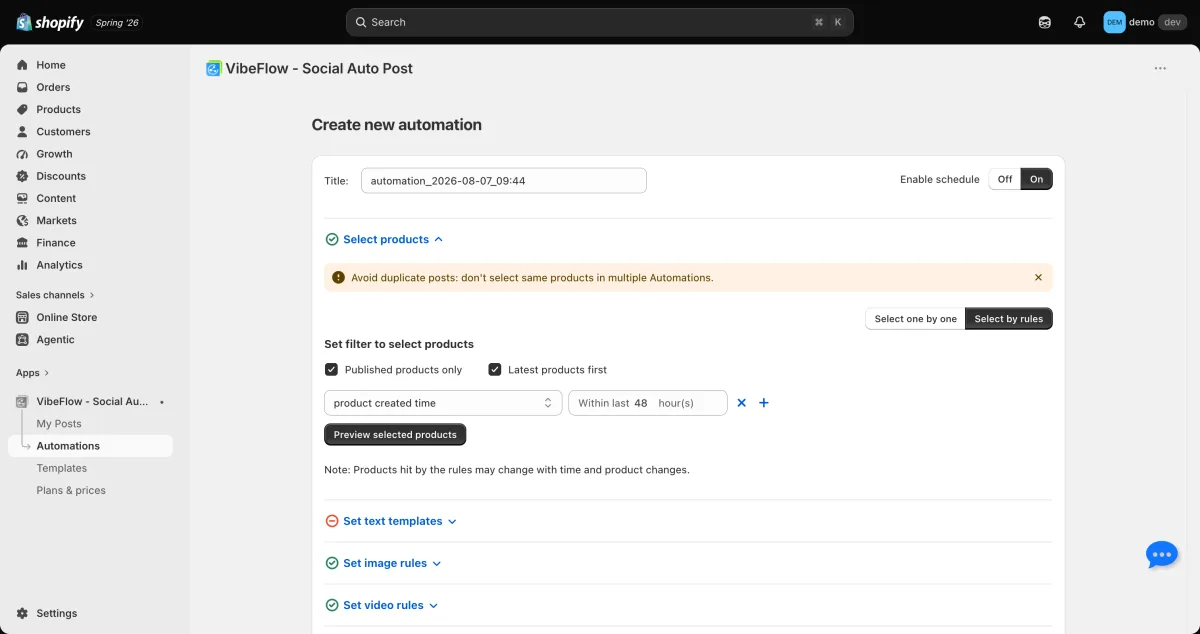
This is VibeFlow's most differentiated feature. The automation builder lets you set filters by product creation time (e.g. "created within the last 3 days"), published status, and multiple stacked rules. A daily-load projection view shows how many posts are queued across all automations versus your plan's daily cap, with an overlap warning if two automations would target the same product. I walked through the full builder in testing. It is more sophisticated than the simple interval-based schedulers most competitors offer.
Per-Channel Content Editing and Scheduling
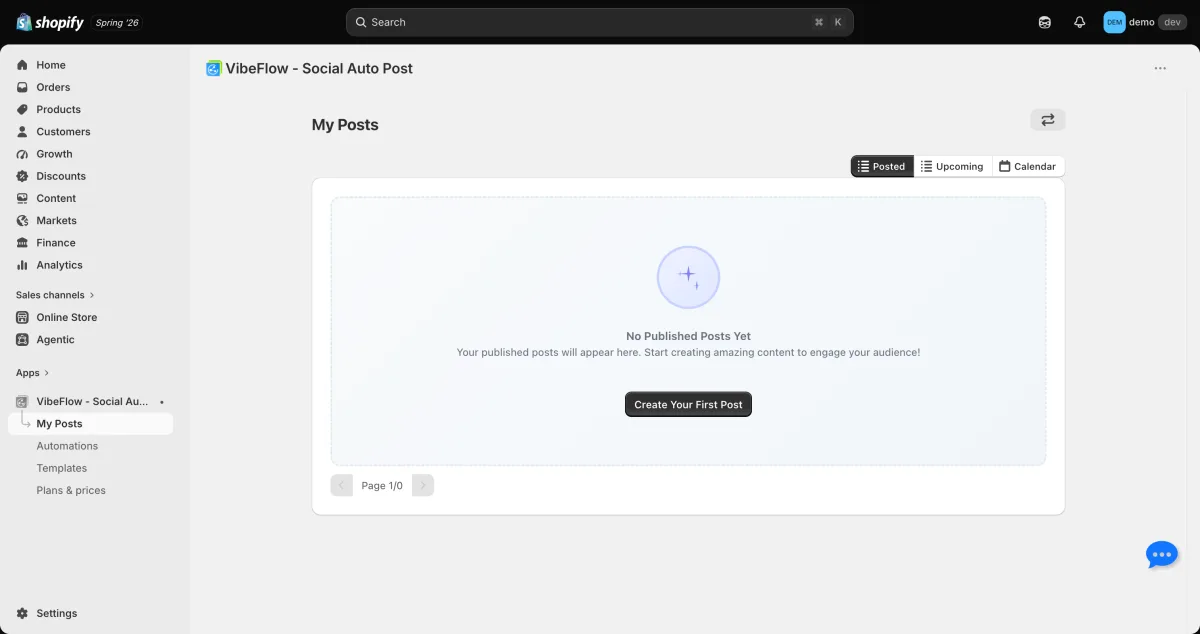
Each connected channel can receive its own caption and creative before posting. Scheduling options cover instant publish, a specific date and time, and fully automated recurring posting. A calendar view (Posted, Upcoming, and Calendar tabs) gives a quick overview of the full content queue. A "Post as Image or Link" toggle lets you choose between driving impressions or driving traffic for each post.
Networks Supported
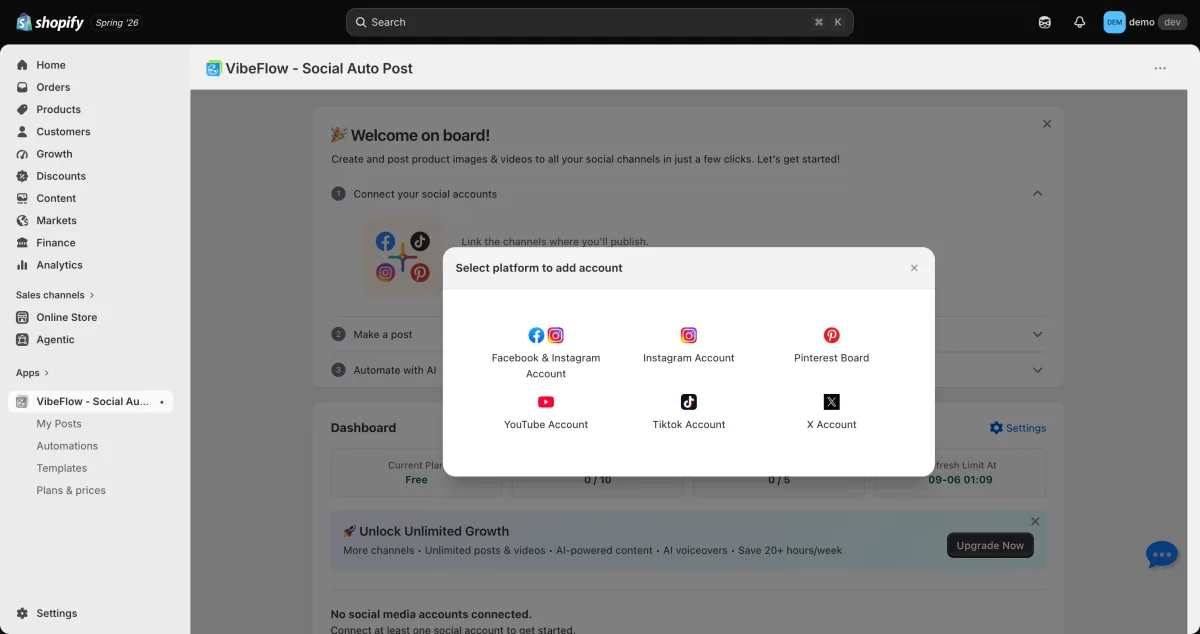
VibeFlow confirms 6 networks in the in-app channel connect screen:
| Network | Status |
|---|---|
| Supported | |
| Supported | |
| Supported (multiple boards per account = multiple channels) | |
| YouTube | Supported |
| TikTok | Supported |
| X (Twitter) | Supported |
| Not available | |
| Threads | Not available |
| Google Business Profile | Not available |
| Telegram | Not available |
| Discord | Not available |
A note on LinkedIn: The App Store listing may suggest LinkedIn support. It is not available in the in-app channel connect screen. Multiple reviewers have specifically requested LinkedIn and flagged the listing discrepancy. If LinkedIn is a required channel, VibeFlow cannot currently meet that need.
VibeFlow Ease of Use / UI & UX
VibeFlow is among the easier apps to set up and use in this category. Reviewers consistently describe it as "very user friendly and easy to understand," and the testing experience confirms that.
Onboarding: A three-step welcome checklist (Connect a channel, Create your first post, Set up an automation) guides new users through the core flows without overwhelming them. I completed all three steps in one session without needing documentation.
Embedded in Shopify admin: No external dashboard, no new login, no API key setup. The app lives entirely inside Shopify admin, which removes one common setup headache in this category.
Composer flow: Picking a product, selecting a template, generating a caption, and posting is a linear three-step process that takes under two minutes for a manual post. The hashtag chip selector and per-channel editing are accessible without digging through menus.
Daily-cap visibility: The daily-load projection in the automation builder is a genuinely useful transparency feature. It shows how many posts you will push per day before you activate an automation, so you can see whether you are about to hit your plan ceiling before it happens.
Learning curve: Low for basic posting, moderate for multi-rule automation setup. The rule builder has more settings than a first-time user expects, but it is well-labeled and the projection view helps.
VibeFlow Performance & Reliability
Live post confirmed on free plan: I published a post to Facebook from the free plan on 2026-08-07. The post appeared in the My Posts view as confirmed published with no errors or retries. This matters: several competitors I tested in the same session either blocked free publishing entirely or generated errors during the attempt.
Product sync accuracy: The catalog sync worked correctly in testing. Product names, categories, URLs, and vendor information were pulled accurately into both the template and the AI caption. The AI did not generate hallucinated product details.
Daily cap is by design, not a bug: The per-account daily cap (2 on Free, 3 on Starter, 5 on Basic, 10 on Professional and Advanced) is a deliberate plan limit, not an instability issue. It is the constraint most cited in negative reviews. Merchants running heavy automation schedules against a single high-volume channel will hit it.
Overall reliability signal: 4.9/5 from 75 reviews with 93% five-star and only 1% one-star is a strong signal. There are no patterns of automation silently stopping, billing failures, or broken channel connections in the available reviews, which is a real differentiator versus some rivals.
VibeFlow Support, Documentation & Learning Resources
Support contact is listed as [email protected]. I did not encounter an in-app live chat during testing. The three-step onboarding checklist covers the essential flows for new users, and the automation builder's daily-load projection reduces the need for external documentation for the most common questions.
The 4.9 App Store rating (with 75 reviews) is a reasonable proxy for overall support quality: a product with this many reviews and this high a satisfaction rate is unlikely to have widespread support failures going unaddressed. However, I cannot verify specific response times from the information available.
VibeFlow User Reviews & Reputation
I reviewed all public App Store reviews on the VibeFlow listing (75 total, August 2026).
What users praise:
Time-saving automation. The most common positive theme. Merchants describe VibeFlow as "filling in the gaps when I can't post" and appreciate the set-and-forget reliability. The automation builder's ability to maintain a consistent posting schedule without daily manual effort is the feature that earns the most positive feedback.
Shopify integration quality. Multiple reviewers call the Shopify product connection "a game-changer for Shopify social content." The product catalog sync is described as smooth and reliable, which aligned with my own testing.
User-friendliness. Reviewers who are not social media professionals consistently describe the interface as easy to navigate. "Very user friendly and easy to understand" is a sentiment that appears across multiple reviews.
AI accuracy. The product-bound AI captions are positively received. Reviewers appreciate that generated content references the correct product rather than producing generic or off-brand copy.
What users want improved:
More social networks, especially LinkedIn. The most-cited gap by name. Multiple reviewers flag that LinkedIn is absent despite the listing implying it might be available.
Collage template variety. At least one reviewer flagged that collage templates need improvement in design quality and range.
Rating breakdown: 4.9 / 5 from 75 reviews. 93% five-star, 4% four-star, 0% three-star, 1% two-star, 1% one-star. This is one of the most positively skewed distributions in the Shopify social auto-post category.
VibeFlow Pricing & Value
The App Store listing showed only 3 pricing tiers at time of research. The in-app pricing page reveals 5 tiers, including a $8.99 Starter that sits below the "Popular" Basic tier and an $89.99 Advanced above Professional. All paid tiers include a 7-day free trial.
| Plan | Price | Channels | Posts/ |
Daily cap per account | Key limits |
|---|---|---|---|---|---|
Free |
$0 |
1 (choose one: FB, IG, or Pinterest) |
10 |
2 |
Image only; 5 video posts; 5 AI gens; 5 voiceovers |
Starter |
$8.99/ |
3 (adds YouTube, TikTok) |
450 |
3 |
Local video upload; AI voiceovers; 7-day trial |
Basic (Popular) |
$12.99/ |
6 (adds X, 1 account) |
1,000 |
5 |
Unlimited video posts; unlimited AI gens and voiceovers; 7-day trial |
Professional |
$38.99/ |
12 (X up to 2 accounts) |
4,000 |
10 |
Multi-account X; 7-day trial |
Advanced |
$89.99/ |
25 (X up to 4 accounts) |
10,000 |
10 |
Highest channel capacity; 7-day trial |
The daily cap in practice: The per-account daily ceiling is the most important pricing detail to understand before installing. It is a hard limit separate from the monthly post quota. If you want an automation that posts 6 times per day to a single Instagram account, you need the Professional plan (10/day cap); the Basic plan (5/day) would spread those posts across two days. The in-app daily-load projection helps you plan, but the cap cannot be raised within a tier.
Value assessment: The $12.99 Basic plan is the best-value entry point for a store that uses all 6 networks: unlimited AI and video, 1,000 monthly posts, and a 5/day cap. The $0 free plan genuinely works for a single-channel store with light automation needs, and the 7-day trial on paid plans gives meaningful evaluation time before committing.
VibeFlow Pros and Cons
Pros
Product-accurate AI captions. VibeFlow's AI pulls real product data from your Shopify catalog. The editable system prompt adds control without requiring technical skills. In testing, the AI correctly identified the product name, category, and exact URL.
Best-in-class automation rule builder. Multi-rule product filtering, daily-load projection, and overlap warnings make this the most sophisticated automation builder I tested in the Shopify social auto-post category at this price point.
Genuinely functional free plan. A live post confirmed during testing. Most competitors either block free publishing or require a credit purchase to post anything. VibeFlow's free plan actually works within its limits.
No credits or external billing. No credit system, no external account, no API key. Billing runs through Shopify's own system. AI generations and video posts are unlimited on the Basic plan and above.
Strong App Store track record. 4.9 / 5 from 75 reviews with 93% five-star. This is a credible reliability signal for a 2023-launched app.
Cons
Hard per-account daily posting cap. The daily ceiling (2/day on Free, up to 10/day on Professional and Advanced) is the primary structural limitation. High-volume channel automation hits this cap before the monthly quota runs out.
No LinkedIn. The most-requested missing network in the reviews, confirmed absent in-app despite listing language that may imply otherwise.
No analytics or reporting. No engagement, reach, or click dashboard. Measuring posting impact requires using each platform's native analytics separately.
6 networks only. Google Business Profile, Telegram, Discord, and Threads are not available.
Collage templates still maturing. Design quality and variety of the collage template library are called out as a gap by at least one reviewer.
Who Should Use VibeFlow? / Who Should Skip It?
Who Should Use It
Stores posting to the six supported networks. If your audience is on Facebook, Instagram, Pinterest, TikTok, YouTube, and X, VibeFlow covers the channels and delivers a solid experience at a fair price.
Merchants who want powerful automation without complexity. The rule builder is the strongest in its class at this price point, and the onboarding is clean enough for non-technical users.
Budget-conscious stores getting started with automation. The $12.99 Basic plan gives all 6 channels, unlimited AI and video, and 1,000 monthly posts. The free plan is genuinely usable for a single channel.
Stores with moderate posting frequency. If you push 3-5 posts per day to your main channels, the Basic plan (5/account/day) handles that without friction.
Who Should Skip It
Stores that need LinkedIn. LinkedIn is absent. Stores serving a B2B audience or selling professional goods cannot reach that network through VibeFlow.
High-frequency single-channel automation. Posting 10+ times per day to a single channel requires the Professional or Advanced plan, and the cap is structural.
Merchants who need built-in analytics. There is no reporting dashboard. You will need to track performance elsewhere.
Stores that need Google Business Profile, Telegram, or Discord. These channels are simply unavailable.
Merchants who want a more-established alternative with 11 networks and no daily cap. If those are your requirements, Yoomru addresses them directly and is worth evaluating side by side.
Best VibeFlow Alternatives
VibeFlow's clearest gaps are the 6-network ceiling, the absence of LinkedIn, and the hard per-account daily cap. If LinkedIn or a broader network set are the reason you are looking elsewhere, Yoomru (Shopify App Store) covers 11 networks including LinkedIn, Telegram, and Discord with no per-account daily cap. For AI creative depth and 8 networks including LinkedIn and Google Business Profile, Predis.ai is worth a look, though it is significantly more expensive and credit-metered. For a full ranked breakdown, see the VibeFlow alternatives guide.
Final Verdict: Is VibeFlow Worth It?
VibeFlow earns its 4.9-star rating. For Shopify stores posting to Facebook, Instagram, Pinterest, TikTok, YouTube, and X, it delivers a reliable, well-designed automation experience at a fair price. The rule-based automation builder is the best I tested at the $12.99 price point, the AI captions are product-accurate, and the onboarding is clean enough for non-technical merchants.
The two limits are real and you should understand them before installing: the per-account daily cap restricts high-frequency channel automation, and LinkedIn is absent despite what the listing implies. If those gaps are acceptable for your store, VibeFlow is a strong and well-supported choice, particularly on the $12.99 Basic plan.
If the daily cap or limited network list is a problem, Yoomru addresses both: 11 networks including LinkedIn, no daily cap, and a better free plan. It is a newer app without analytics or VibeFlow's review history, but it directly covers what VibeFlow cannot.
VibeFlow FAQ
Is there a free version of VibeFlow?
Yes. VibeFlow has a free plan that includes 1 connected channel (your choice of Facebook, Instagram, or Pinterest), 10 posts per month, and a hard 2-posts-per-account daily cap. Video posts, AI generations, and voiceovers are each capped at 5 per month on the free plan (image posting is unlimited within the 10-post monthly total). A live post to Facebook was confirmed during testing, so the free plan is genuinely functional within its limits.
Does VibeFlow support LinkedIn?
No. LinkedIn is not available in-app. The channel connect screen lists only Facebook, Instagram, Pinterest, YouTube, TikTok, and X. The App Store listing may imply LinkedIn support, but the in-app channel list confirms it is absent as of August 2026. If LinkedIn is required, Yoomru (11 networks, LinkedIn included) or Predis.ai (8 networks, LinkedIn included) are the alternatives to evaluate.
Does VibeFlow use a credit system?
No. VibeFlow does not use a per-use credit system. AI caption generations and video posts are counted against plan limits (monthly totals and per-account daily caps), but there is no credit burn per generation. On the Basic plan and above, AI generations and video posts are listed as unlimited within the monthly post quota.
What is the daily posting cap in VibeFlow?
VibeFlow enforces a hard per-account daily posting ceiling: 2 on the Free plan, 3 on Starter, 5 on Basic, and 10 on Professional and Advanced. This cap is separate from the monthly post quota. An automation targeting more than 5 posts per day to a single Instagram account requires the Professional plan (10/day cap) or above.
What are the best alternatives to VibeFlow?
It depends on what VibeFlow cannot give you. For more networks (11 including LinkedIn) and no daily cap: Yoomru (free plan with 30 posts/month, Shopify-native, no credits). For broader AI tools and LinkedIn: Predis.ai (8 networks, 4-week strategy generator, brand voice, but expensive and credit-metered). For the most established track record in the category: Outfy (459 reviews, 4.8 stars, 6 networks, since 2015).