
 Facebook
 Instagram
 X (Twitter)
 TikTok
 Pinterest
 YouTube
 LinkedIn
 Threads
 Google Business Profile
 Telegram
 Discord
Plan My Social Review (2026): Features, Pricing, Pros and Cons


Is it worth subscribing to Plan My Social before you have seen a single screen of the app? And does the 3-day trial the listing advertises actually appear when you install it?
See how this app compares to all other Shopify social auto-post apps in our complete guide to the best shopify apps for automation social media posts.
These are fair questions to ask before handing over payment details to a social scheduling app. This plan my social review is based on a live install on a Shopify demo store in August 2026, a full read of all six public App Store reviews, and a review of the App Store listing and pricing plans. The app immediately redirected me to a subscription screen after install, so a hard paywall prevented access to the full interface. That experience is part of this review, not a footnote.
The short version: the pricing is genuinely competitive and the content calendar concept fits merchants who plan in advance. The install experience, support model, and reliability signals in the public reviews are real concerns before you commit.
What Is Plan My Social?
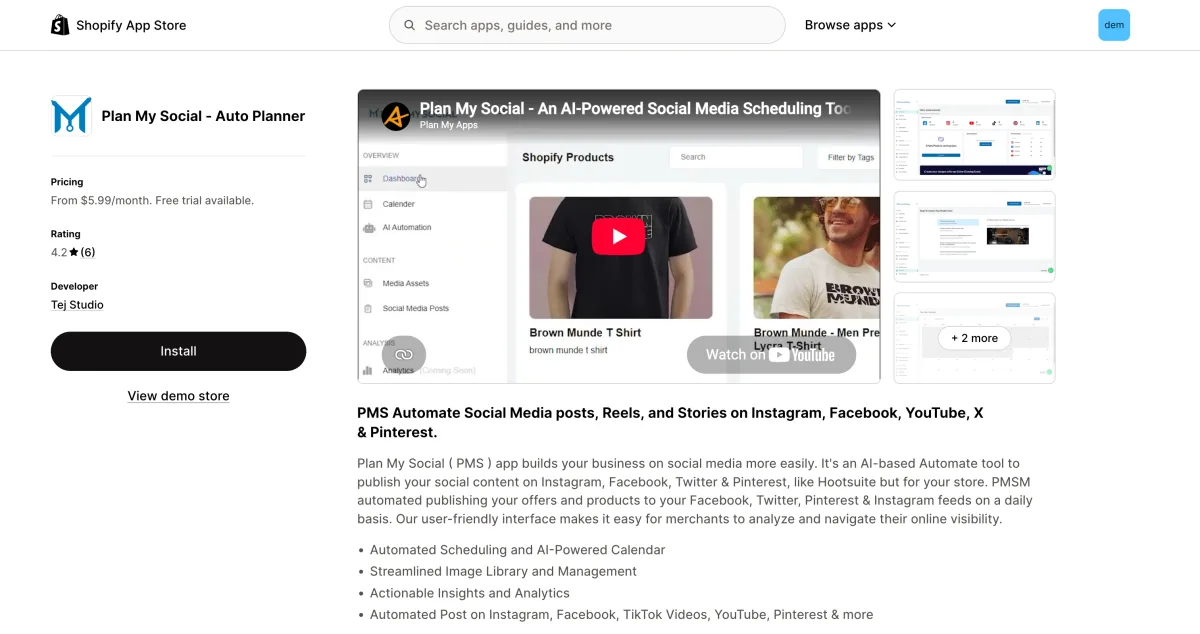
Plan My Social is developed by Tej Studio, a small development team, and launched on the Shopify App Store in September 2023. The app is positioned as a Hootsuite-style content calendar and multi-platform social scheduler for Shopify merchants, combining AI-assisted image post automation with a visual weekly and monthly planning calendar and Shopify product integration.
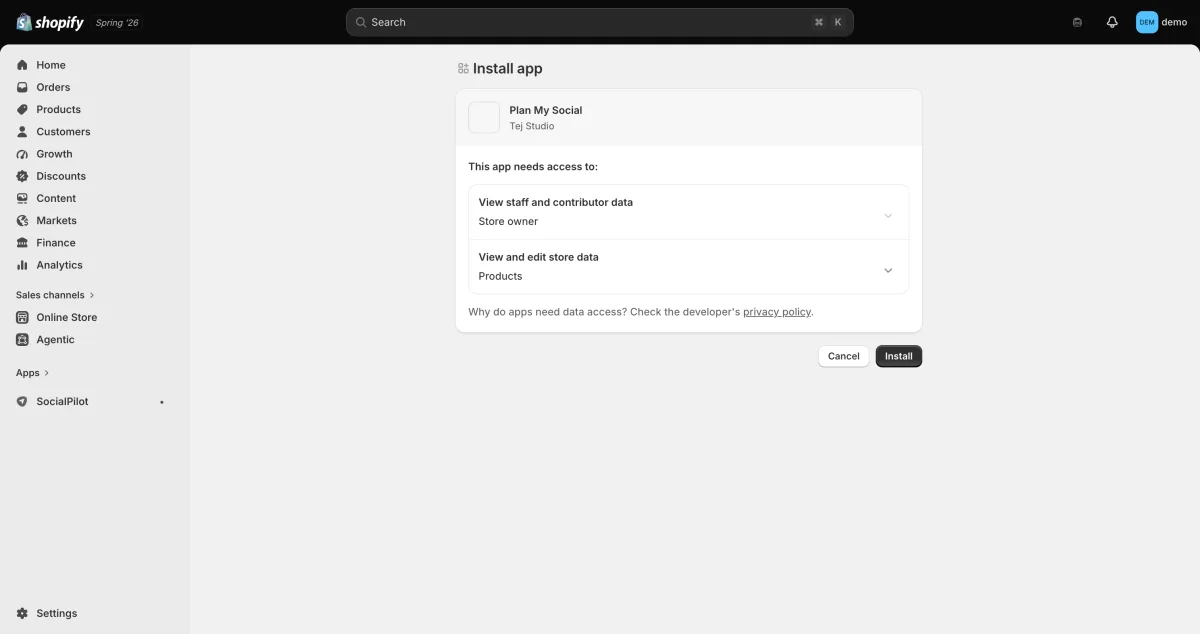
One important architecture note: Plan My Social is not embedded inside Shopify admin, and it is not listed as Built for Shopify. After installing from the App Store, you are immediately redirected to an external SaaS platform at planmysocial.ai. A subscription screen is the first thing you see; no dashboard, calendar, or settings are accessible without a paid plan.
Plan My Social Review Quick Verdict
Plan My Social sits at the affordable end of the Shopify social scheduling category and offers a content calendar with multi-platform image posting. The install friction and the reliability signals from the public reviews are the main reasons to move carefully.
| Criteria | Verdict |
|---|---|
| Best for | Budget-conscious merchants who want a planning-first scheduler and are comfortable subscribing before exploring |
| Not ideal for | Merchants who want a free trial to test before paying, need AI video creation, or prefer email-first support |
| Starting price | $5.99/ |
| Free plan / trial | No free plan; 3-day trial listed but not visible at install |
| Networks supported | 7 listed (unverified in-app): FB, IG (incl. Reels and Stories), Pinterest, TikTok, YouTube, X/ |
| Most valuable features | AI content calendar, AI daily image posts (1-5/ |
| Ease of use | 3/ |
| Feature richness | 5/ |
| Reliability (from reviews) | 3/ |
| App Store rating | 4.2/ |
Plan My Social Features and Functionality
Plan My Social's features come from the App Store listing and the subscription plans screen. Because the hard paywall prevented access to the full interface during my install, none of these features were hands-on tested. I note this clearly where relevant.
1. AI Content Calendar
Weekly and monthly scheduling built around a visual content calendar. This is the app's central pitch: planning social posts in advance rather than reacting post by post. The calendar-first approach is a genuine fit for merchants who think in campaigns rather than single posts.
2. AI Daily Image Posts
The app auto-generates and publishes image posts at 1, 3, or 5 per connected social account per day depending on the plan. These are image posts only; no AI video is generated at any plan level. On Pro and Premium tiers, the listing indicates support for publishing existing video media (Reels, TikTok videos) from your library, but the app does not create or render video itself.
3. Shopify Product Fetch
Product images and details are pulled from your Shopify catalog for use in scheduled and automated posts. The degree of real-time catalog sync is not documented in publicly accessible material without a subscription.
4. Analytics and Insights
Actionable insights and performance reporting are listed as a feature across plans. The depth of the analytics dashboard is not detailed in public documentation.
5. Optimal Timing and Hashtag Suggestions
AI best-time-to-post recommendations are available on Pro and Premium plans. AI hashtag suggestions are on Pro and Premium, with curated hashtag packs on Premium only.
Networks Supported
| Network | Supported |
|---|---|
| Listed | |
| Instagram (incl. Reels and Stories) | Listed |
| Listed | |
| TikTok (video publishing from existing media) | Listed |
| YouTube | Listed |
| X/ |
Listed |
| Listed | |
| Threads | No |
| Google Business Profile | No |
| Telegram | No |
| Discord | No |
Total: 7 networks listed. All 7 are confirmed from the App Store listing only. In-app verification was not possible because the subscription paywall blocked access to the channel connection flow. If the listing is accurate, 7 networks is a solid selection for the price point in this category, though it excludes Threads, Google Business Profile, Telegram, and Discord.
Plan My Social Ease of Use
The install experience is the most significant usability data point available without a paid subscription.
Install to paywall in one step. After installing from the Shopify App Store, the app immediately redirects to a subscription plans screen on the external planmysocial.ai platform. There is no dashboard, calendar, product browse, or channel connection flow visible before subscribing. Of the 9 Shopify social auto-post apps I tested on the same demo store, this is the most aggressive install-to-paywall pattern in the category.
External SaaS, not native to Shopify admin. Every session requires a redirect out of Shopify admin to a separate platform. This is a consistent friction point compared to apps embedded directly in the Shopify dashboard.
3-day trial not surfaced at install. The listing advertises a 3-day trial on all plans. During the live install, only Subscribe buttons appeared on the plans screen with no trial option visible. This may be a presentation issue, but it reduces first-impression confidence.
WhatsApp-first support. Support is directed to WhatsApp as the primary contact channel, with email available as an additional option. A 1-star reviewer explicitly objected to this ("I should not have to download WhatsApp"), and it creates a barrier for merchants who do not use WhatsApp.
No in-app documentation. A 2024 1-star review noted "no basic help instructions within the app." Whether this has been addressed since is not verifiable without a subscription.
Ease of use score: 3/10. The issue is not interface complexity; it is the complete absence of any explorable interface before financial commitment, combined with support friction and an unverified trial claim.
Plan My Social Performance and Reliability
For social auto-post apps, performance means posts firing on schedule, subscriptions working at install, and the billing layer functioning correctly. Plan My Social has documented problems at the most basic operational layer.
Install and subscription failure documented. The clearest signal in the public reviews:
"Terrible experience. doesnt install, subscription isnt working." (Stone Motorsport, 1-star, May 2025)
This describes a failure at the very first step: install itself did not work, and the subscription flow failed alongside it.
Billing risk at a hard paywall. Requiring payment before any app UI is visible creates a specific failure mode: if the subscription or install fails, a merchant may be billed before accessing anything. This is the scenario implied in the Stone Motorsport review.
In-app testing not possible. Because the hard paywall prevented access to any posting, scheduling, or calendar functionality, there are no live performance results from direct testing. All reliability signals here are sourced from public reviews.
Reliability score: 3/10. A documented install-and-subscribe failure combined with a billing-risk structure at a hard paywall is more fundamental than a feature bug. No live auto-posts or scheduling actions could be confirmed.
Plan My Social Support, Documentation and Learning Resources
Plan My Social directs users to WhatsApp as the primary support channel, with email listed as an additional option. The developer responds personally to App Store reviews, including both 1-star reviews, which signals active engagement with public feedback.
The in-app documentation gap noted in the 2024 1-star review is a concern. At a 4.2/5 overall App Store rating (mid-range, mixed signal band per this review standard), the support experience is at best uneven. Neither positive review cites support quality as a strength, and one 1-star review is specifically about support friction.
Plan My Social User Reviews and Reputation
I reviewed all 6 public App Store ratings available as of August 2026. The overall picture: 4.2/5, 50% five-star (3 reviews), 17% four-star (1 review), 33% one-star (2 reviews). With only 6 reviews total, every rating carries significant weight.
What users praise:
- The core automation concept reducing manual posting effort. The one clearly positive recent review reads simply: "This app make my social media posting worry free." (Fashion Fort, February 2026)
- Multi-platform posting streamlining.
What users criticize:
- Install and subscription failures, with billing implications. (Stone Motorsport, 1-star, May 2025)
- WhatsApp-only primary support channel and absence of in-app documentation. (Robin Lewis Art, 1-star, January 2024)
- One reviewer raised data collection concerns; the developer clarified only product data is used for scheduling.
A 33% one-star rate across a 6-review pool is a signal worth taking seriously. Both negative reviews describe system-level failures, not edge cases or missing feature preferences.
Plan My Social Pricing and Value
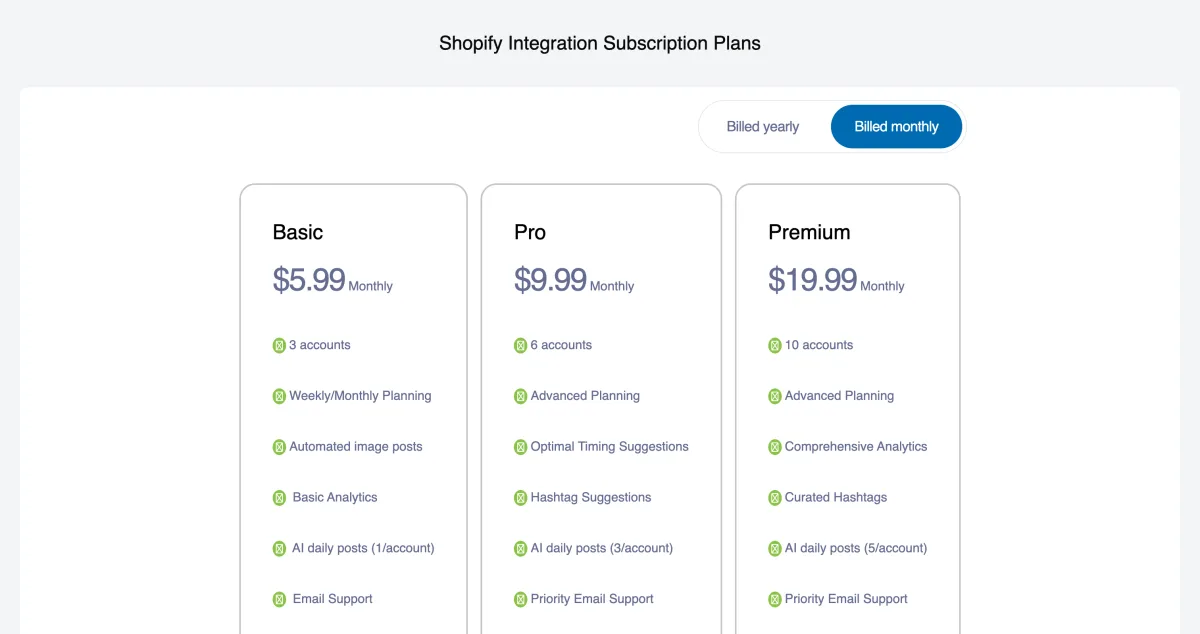
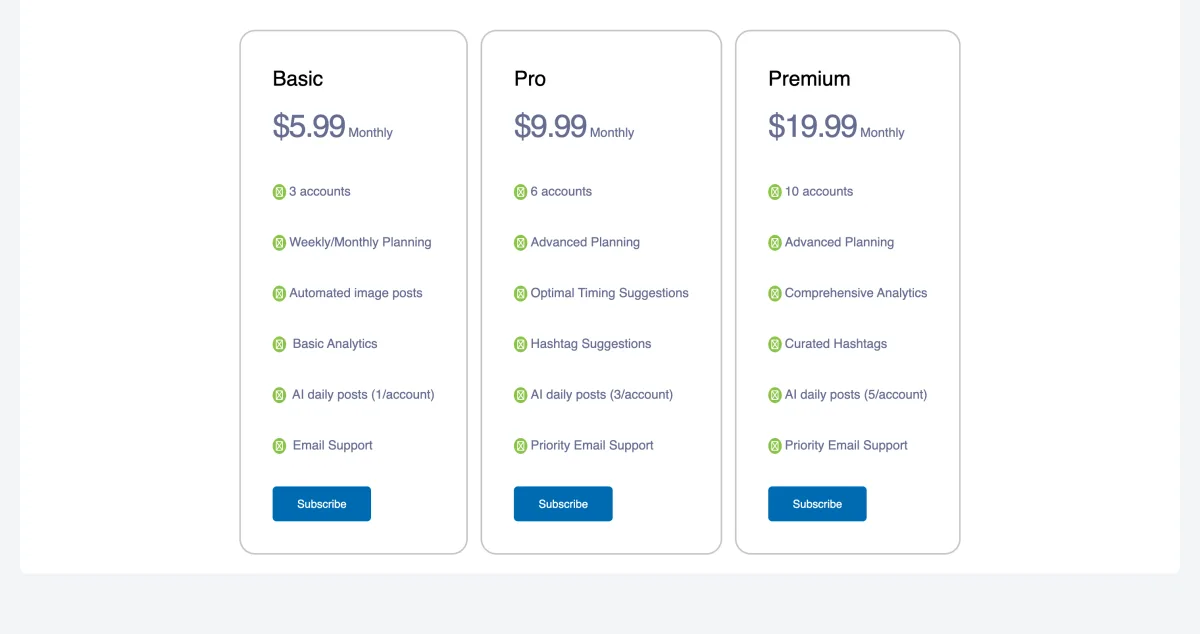
Three monthly tiers, each with an annual option at approximately 17% savings. Billing goes through the external planmysocial.ai platform, not through Shopify's Managed Pricing system.
| Plan | Monthly | Annual | Social accounts | AI image posts/ |
|---|---|---|---|---|
| Basic | $5.99 | $59.99/ |
3 | 1 |
| Pro | $9.99 | $99.99/ |
6 | 3 |
| Premium | $19.99 | $199.90/ |
10 | 5 |
No free plan. There is no zero-cost tier. All use requires a paid subscription from the first screen after install.
Trial gap. The App Store listing states a 3-day trial is included on all plans. During the live install test, only Subscribe buttons were visible. Whether a trial requires a separate activation step not visible on the plans screen, or was simply absent, is unclear. Verify before assuming the trial applies.
Hard paywall on install. You must select and pay for a plan before any part of the app UI is visible. This is the most aggressive subscribe-before-you-see paywall in the Shopify social posting category.
$5.99/month is among the lowest headline prices in the category. It is not the absolute cheapest (Minta Starter is $5/month) but it undercuts most direct competitors. For price-sensitive merchants committed to a content calendar workflow, this is a genuine advantage.
Optimal timing, hashtag suggestions, and curated hashtags are reserved for Pro and Premium.
Plan My Social Pros and Cons
Pros
Among the lowest prices in the category At $5.99/month, Plan My Social is one of the most affordable paid entry points among Shopify social scheduling apps. The price is a genuine draw for budget-focused merchants committed to a calendar-first posting workflow.
Content calendar-first approach The visual weekly and monthly content calendar is the product's core feature. Merchants who want to plan content campaigns in advance rather than posting reactively will find this structure a better fit than tools built around single-post automation.
Seven listed networks, including Reels, Stories, and YouTube If the listing is accurate, 7 networks including Instagram Reels and Stories, TikTok video publishing, and YouTube is a solid breadth for the price tier.
Developer actively responds to reviews The developer replies personally to every App Store review including negative ones, which signals active maintenance for a small-team app.
Cons
Hard paywall before any exploration is possible Plan My Social was the only app among the 9 I tested that showed a subscription screen as the very first screen after install, with no dashboard, calendar, or any explorable UI available before payment.
Documented install and subscription failures A 1-star reviewer reported that the install itself did not work and the subscription flow failed. The combination of required upfront payment and a reported subscription failure is a significant operational risk.
WhatsApp-first support with no in-app documentation WhatsApp is the primary support channel with email as a secondary option. This prompted an explicit 1-star complaint from a merchant who does not use WhatsApp. In-app help was also absent at launch.
Image-only AI automation, no video generation The AI automation engine creates image posts only. Plan My Social does not generate video content at any plan level. For merchants who need Reels, TikTok videos, or YouTube Shorts created automatically, this is a fundamental gap.
Only 6 reviews, with 33% being 1-star The review pool is too small for firm conclusions, but both 1-star reviews document system failures rather than minor complaints. This is a meaningful trust signal given the hard paywall and required upfront payment.
Who Should Use Plan My Social and Who Should Skip It
Who Should Use It
- Budget-focused merchants who are committed to a content calendar workflow and are comfortable subscribing upfront before exploring the interface.
- Stores whose social strategy centers on image posts across Facebook, Instagram, Pinterest, TikTok, X/Twitter, LinkedIn, and YouTube.
- Merchants for whom $5.99/month is the primary decision criterion and who can verify the app functions correctly in their account within the advertised trial period.
Who Should Skip It
- Merchants who want to explore a product before paying. No free plan exists, and the trial flow was not visible at install; the first screen after install is a subscription paywall.
- Stores that depend on AI video creation. Plan My Social does not generate video at any plan level.
- Anyone who needs non-WhatsApp primary support. The WhatsApp-first model creates friction for merchants who do not use or want WhatsApp.
- Stores that need Telegram, Discord, Google Business Profile, or Threads. None of these are listed or supported.
- Merchants who want native Shopify admin integration or Shopify Managed Pricing. Plan My Social is an external SaaS with its own billing infrastructure.
If any of those gaps describe your situation, the next section covers the strongest alternatives.
Best Plan My Social Alternatives
If Plan My Social's hard paywall on install, image-only automation, or limited network coverage are concerns, the two strongest alternatives are Yoomru (Shopify App Store), which has 11 networks, a real free plan, no paywall on install, branded product video, and native Shopify admin integration, and Outfy, the most proven app in the category with 459 reviews and a real free plan. For a full comparison of every option, see the Plan My Social alternatives guide.
Final Verdict: Is Plan My Social Worth It?
Plan My Social is a budget-positioned content calendar with one of the lower price points in the Shopify social scheduling category. The planning-first UX is a genuine fit for merchants who think in weekly and monthly campaigns, and the 7 listed networks are competitive at $5.99/month if the listing is accurate.
The practical concerns are just as real. The subscribe-before-you-see install is the most aggressive paywall I encountered across all 9 apps tested on the same demo store. The 3-day trial was not visible at install. Public reviews document a failed install with billing implications and explicit frustration with WhatsApp-first support. And the AI automation is image-only, with no video generation at any plan level.
For merchants who are price-sensitive, committed to a calendar-first workflow, and willing to pay before seeing any interface, Plan My Social's pricing is attractive. Verify the trial and install carefully before entering payment details.
If you need a no-paywall entry, a genuine free tier, broader network coverage including Telegram or Discord, or video automation, Yoomru is worth evaluating first. It is a newer app still building its review count, but the install experience, integration model, and pricing are transparent from the first screen.
Plan My Social FAQ
Is there a free plan for Plan My Social? No. Plan My Social does not offer a free plan. All use requires a paid subscription starting at $5.99/month. The App Store listing states a 3-day trial is available on every plan, but during a live install test in August 2026 only Subscribe buttons appeared on the plans screen with no trial option shown. Contact the developer to clarify before assuming the trial applies.
Does Plan My Social actually show the 3-day trial at install? The trial was not visible during the live install test. Only Subscribe buttons appeared on the plans screen. Whether this is a display gap or reflects current policy is unclear. The listing claims a trial exists, but it was not surfaced in the install flow tested.
Which social networks does Plan My Social support? The App Store listing claims 7 networks: Facebook, Instagram (including Reels and Stories), Pinterest, TikTok, YouTube, X/Twitter, and LinkedIn. These are listing-only claims; in-app verification was not possible due to the subscription paywall. Threads, Google Business Profile, Telegram, and Discord are not listed.
Does Plan My Social create video content automatically? No. Plan My Social does not generate AI video at any plan level. The AI automation creates image posts only, at 1, 3, or 5 per social account per day by plan. On Pro and Premium, you can publish existing video media from your library, but the app does not render or produce video itself.
What are the best Plan My Social alternatives? The three strongest options: (1) Yoomru for 11 networks, a real free plan, no paywall at install, branded product video from Starter, and native Shopify admin integration; (2) Outfy for the most proven and feature-rich tool in the category with 459 reviews and a real free plan; (3) VibeFlow for a genuine free plan, 6 networks, and native Shopify admin integration at $8.99/month. See the Best Plan My Social Alternatives section above for full details.